This is NOT your fault, and it is NOT a problem with your website.
Google’s Page Indexing report is missing historical data before December 15, 2025, for ALL properties globally. This is a reporting interface bug, a direct side effect of GSC’s major processing latency issues from late November and early December 2025.
Your pages are still indexed. Your rankings are not affected. Your traffic has not dropped because of this. The data gap exists only inside the GSC reporting UI, not inside Google’s actual index.
What to do right now: Do NOT resubmit your sitemap. Do NOT restructure your site. Do NOT panic. Read this guide, bookmark it for updates, and use the action plan.
TL;DR — What You Will Learn
- What exactly the GSC data gap looks like and why it happened
- The full timeline of events from November 2025 to today
- Why this does NOT affect your actual indexing or rankings
- A 5-step action plan for what to do right now
- A ready-to-send client email template explaining the issue
- How to protect your GSC data from future gaps
- What to expect from Google going forward
What Exactly Is Happening in Your GSC?
If you opened your Google Search Console in late February 2026 and noticed that your Page Indexing report looked like your site was born on December 15, 2025 no prior history, no trend lines before that date, just a blank or zero-flat chart going back before mid-December you are experiencing a confirmed, global GSC reporting bug.
You are not imagining it. Your site is not penalized. And you are very far from alone.
What It Looks Like
The symptom appears in two specific places inside GSC:
- Page Indexing report (Indexing > Pages): The historical trend chart shows a flat line or blank period for all data before December 15, 2025. The numbers may show current indexed page counts correctly, but the timeline graph has no history before that date.
- The data chart cliff: Your indexed pages trend line appears to suddenly start from zero on December 15 as if Google had never crawled your site before that date. In reality, it is a display error in the reporting interface, not a reflection of actual index status.
- Coverage reports affected: Both the ‘All known pages’ view and the individual exclusion reason breakdowns lose their historical data before the December 15 cutoff.
Which Reports Are Affected
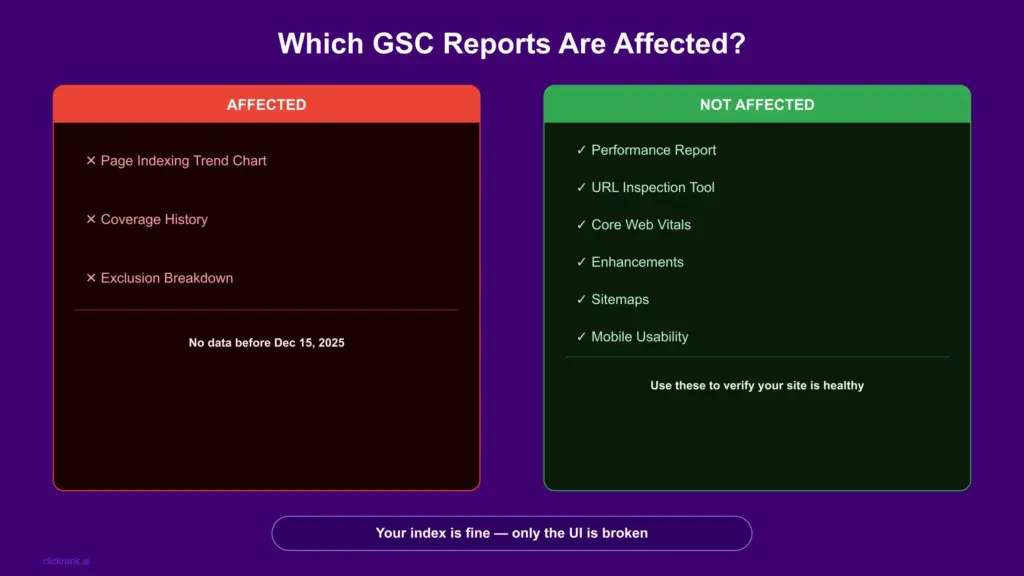
| GSC Report | Affected? | What You See |
| Page Indexing — trend chart | YES | No data before Dec 15, 2025 |
| Page Indexing — current counts | PARTIAL | Current numbers mostly accurate |
| Performance report | NO | Fully intact—use this for proof |
| URL Inspection Tool | NO | Works normally per page. |
| Sitemaps report | NO | Unaffected |
| Core Web Vitals | NO | Fully intact |
| Enhancements reports | NO | Fully intact |
Why Did This Happen? The Root Cause Explained
To understand the data gap, you need to understand what happened inside Google’s reporting infrastructure in November and December 2025. This is not a single isolated event; it is the compounding result of two separate but connected issues.
The November–December 2025 GSC Latency Crisis
Starting in mid-November 2025, Google Search Console began experiencing severe data processing delays. Reports across all properties stopped updating in real time. The Page Indexing report, the Performance report, and Coverage data all fell significantly behind, in some cases by 10 to 14 days.
This was widely reported in the SEO community and acknowledged by Google’s team. The platform was effectively “stuck”; Googlebot was still crawling normally, and the actual index was operating as expected, but the reporting layer that translates crawl data into the GSC dashboard was backlogged.
The December Backlog Clear And What It Broke
Around December 18, 2025, Google resolved the processing backlog. Reports began updating again. Most SEOs celebrated the return of live data and moved on. However, the process of clearing the backlog appears to have created a secondary problem: when Google reconnected the current data pipeline, it did not seamlessly stitch the historical archive back to the live reporting interface.
The result is what you are seeing now: a clean break at December 15. Everything before that date is in a disconnected archive that the current UI cannot access or display. Everything after December 15 appears normally.
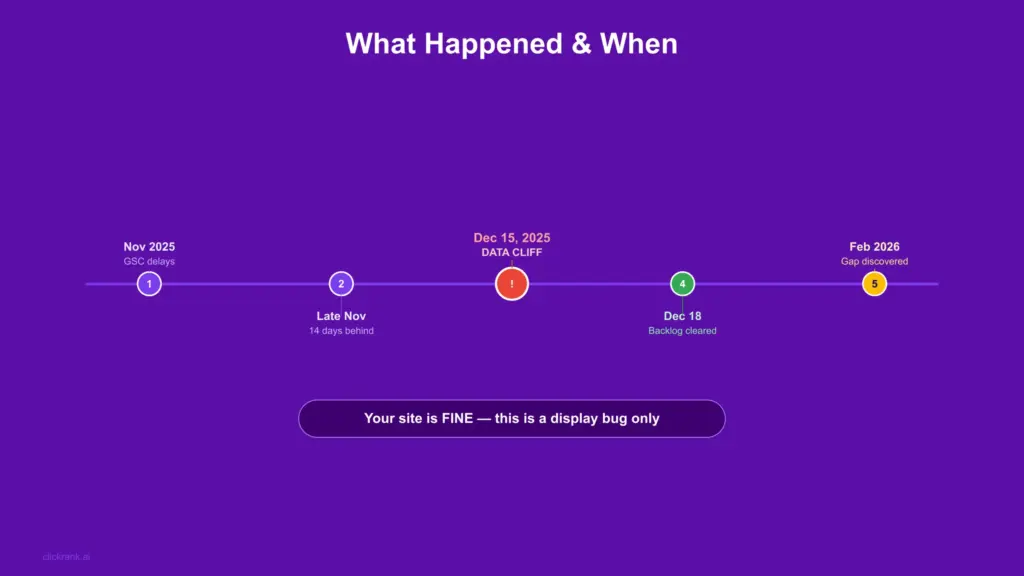
The Timeline of Events — Complete Chronology
| Date | Event | Impact on GSC |
| Mid-November 2025 | GSC data processing delays begin | Reports stop updating in real time |
| Late Nov 2025 | Latency worsens—up to 14 days behind | Page Indexing and Performance data stale |
| Dec 15, 2025 | The data archive effectively disconnected during backlog processing | This becomes the ‘data cliff’ date |
| Dec 18, 2025 | Google clears the processing backlog | Live data resumes—historical gap created silently |
| Jan–Feb 2026 | Most SEOs focused on current data—gap unnoticed | Historical reports appear normal for new date ranges |
| Feb 23, 2026 | The community discovers and reports the historical gap widely | Bug confirmed as global by multiple sources |
| Feb–Mar 2026 | Google acknowledges—no ETA for fix yet | Monitoring for updates continues |
Does This Affect Your Rankings or Actual Indexing?
This is the question every site owner and SEO professional needs answered immediately. The answer is clear and documented.
Your Pages Are Still Indexed
The Page Indexing report is a reporting interface it displays data about what Google has indexed. It does not control what Google indexes. The underlying index itself was never affected by the reporting latency issues or the subsequent data gap.
To verify your own indexed pages right now, use these three methods instead of the affected trend chart:
- URL Inspection Tool: Paste any specific URL, and it will show you the real-time index status of that page. This tool pulls from the live index, not the reporting archive.
- Performance report: If your pages are receiving clicks and impressions in the performance report, they are indexed. This report is completely unaffected by the December data gap.
- Google site: search operator: Search site:yourdomain.com in Google. While not comprehensive, a healthy number of results confirms your pages are in the index.
Your Rankings Have Not Changed Because of This
Rankings are determined by Google’s search algorithm operating on the live index. The GSC reporting interface is a read-only window into that data it does not feed back into the ranking system. A bug in the display layer has zero effect on how your pages rank.
If you have experienced ranking drops in this period, those are caused by other factors algorithm updates, competitor activity, content changes, or technical issues on your own site. The GSC data gap is not the cause.
What NOT to Do: Common Panic Mistakes
WARNING — Do NOT do any of the following:
- Do NOT resubmit your entire sitemap thinking it will ‘restore’ indexed pages. Your pages are still indexed.
- Do NOT add noindex and re-index tags to ‘reset’ the coverage report. This will actually cause real deindexing.
- Do NOT restructure your URL hierarchy or internal links based on this data. The data is a display error, not reality.
- Do NOT change your robots.txt based on what you see in the report right now.
- Do NOT file emergency support tickets unless you have independent evidence of actual ranking drops.
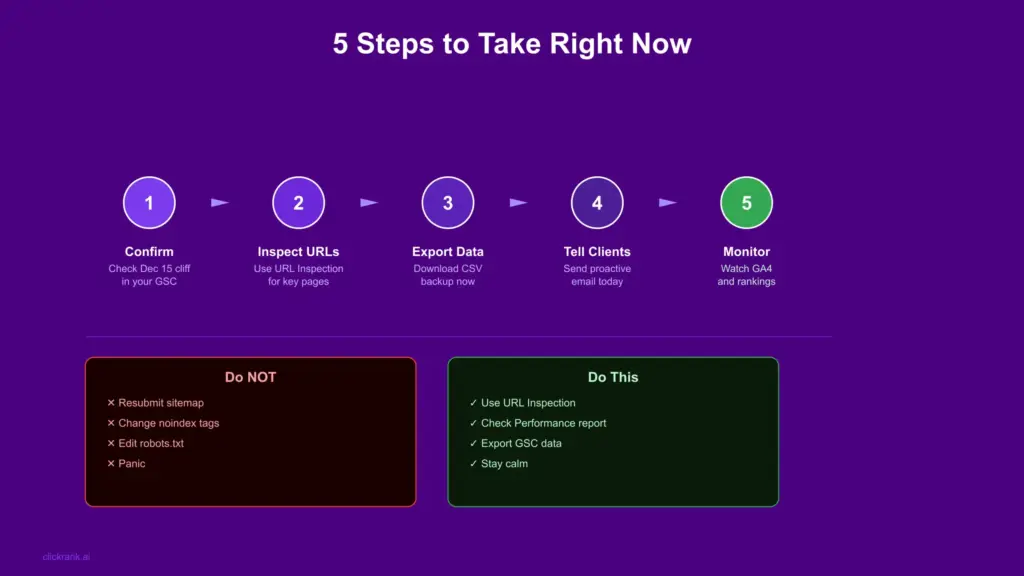
What Should You Do Right Now? — 5-Step Action Plan
Here is a clear, prioritised action plan for what to actually do in response to this issue.
Step 1: Confirm It Is Global, Not Just Your Site
Before taking any action, confirm you are dealing with the known global bug and not a separate site-specific issue. Check two things:
- Open the Page Indexing report and look for the data cliff at December 15. If you see a sharp drop to zero or blank data precisely at that date, this is the global bug.
- Check your performance report. If clicks and impressions are showing normally through the same period, your site is healthy and indexed correctly.
Step 2: Use URL Inspection for Any Critical Pages
For any high-priority pages, revenue-generating pages, recently published content, pages you recently updated run them through the URL Inspection Tool. This gives you the real-time index status independent of the reporting bug.
- Go to URL Inspection in GSC left sidebar
- Enter each critical URL and confirm ‘URL is on Google.’
- Note the last crawl date; it should be recent for active pages
- Document results in a spreadsheet for client reporting purposes
Step 3: Export Current Data Immediately
Even though the historical data is inaccessible in the UI, the data that IS currently visible should be exported as a backup before any further changes or potential future UI updates.
- In the Page Indexing report, click Export > Download CSV for current page status
- In the Performance report, export the last 16 months of data to Google Sheets
- Save these exports with a date stamp they are your baseline reference
Step 4: Check the Search Status Dashboard
Google maintains a public Search Status Dashboard at status.search.google.com that shows known issues with Search products. Check this for any official annotation or update related to the page indexing report data gap. This is also where Google will post updates when a fix is deployed.
Step 5: Monitor and Wait — Do Not Over-Respond
The most important step for most sites is simply to monitor. Track your organic traffic in GA4, monitor keyword rankings through your preferred tool, and check the performance report weekly. If these are stable, your site is performing normally despite the reporting gap.
Protect Your GSC Data — Backup Strategy for the Future
This issue has exposed a critical vulnerability: many SEOs and site owners rely entirely on the GSC interface for historical indexing data. When that interface has a bug, the data becomes inaccessible. Here is how to build resilience against future gaps.
Weekly GSC Export to Google Sheets
The simplest and most accessible backup method. Set a weekly recurring task to export your Page Indexing report and Performance report data to a dedicated Google Sheet. This takes 5 minutes per week and ensures you always have a local copy of data regardless of what happens in the GSC interface.
- Go to each report in GSC
- Click the Export button (top right) > Google Sheets
- Save to a dedicated folder: ‘GSC Backups > [Site Name] > [Date]’
- Keep a rolling 12-month archive minimum
BigQuery Integration for Automated Backup
For agencies and larger sites, BigQuery integration with GSC provides automated, continuous data export that operates independently of the GSC reporting interface. Once configured, your search data is stored in your own Google Cloud project immune to any future GSC UI issues.
- In Google Cloud Console, create a new project or use an existing one
- In GSC, go to Settings > Search Console Data Export > Connect to BigQuery
- Select your Cloud project and choose your export frequency
- Data begins flowing into BigQuery tables within 24–48 hours
- Use Looker Studio to build dashboards directly from BigQuery data
The cost is minimal for most sites BigQuery charges per query and per storage. A typical site’s GSC data costs less than a few dollars per month in storage and querying.
Third-Party Tool Redundancy
Maintain at least one third-party ranking and traffic monitoring tool alongside GSC. Tools like Semrush, Ahrefs, or Sistrix collect their own data independently of Google’s reporting infrastructure. When GSC has issues, these tools provide a reliable secondary data source.
What to Expect from Google Timeline and Resolution
Based on Google’s historical behaviour with similar GSC reporting issues, here is what is most likely to happen next.
Possible Resolution Paths
| Scenario | What Happens | Likelihood |
| Data backfilled | Google reconnects the historical archive to the current UI data reappears in charts | Moderate depends on data integrity |
| Chart annotation added | Data gap period gets a permanent note on the chart: ‘Data unavailable for this period’ | High Google’s most common response |
| Partial recovery | Some data returned, some permanently lost — new baseline established from Dec 15 | Moderate |
| No official action | Issue quietly resolved in next GSC update with no announcement | Low too widespread for silence |
Where to Monitor for Official Updates
- Google Search Central Blog: google.com/search/blog official announcements from Google’s Search team
- Search Status Dashboard: search.google.com real-time status of all Google Search products
- Google Search Central on X/Twitter: @googlesearchc fastest channel for informal updates and confirmations
- Search Engine Roundtable: com Barry Schwartz monitors and reports Google community issues fastest
How to Know When It Is Fixed
The fix will be obvious your historical trend data will reappear in the Page Indexing report before December 15, or a grey annotation band will appear over the gap period explaining the data unavailability. Either way, no action is required on your part when this happens. Simply resume using the report as normal.
Stay Calm, Stay Informed, Stay Backed Up
The GSC Page Indexing report data gap before December 15, 2025 is one of the most visible and alarming-looking platform bugs Google has had in recent years. A blank chart where months of historical data used to be is genuinely unsettling — especially when you have clients expecting regular reporting.
But the reality is straightforward: your site is fine, your pages are indexed, and your rankings are not affected. This is a reporting interface issue caused by GSC’s December infrastructure work not a reflection of anything that happened to your website.
The three things to do right now:
- Verify your site health through URL Inspection and the Performance report — not the affected trend chart
- Communicate proactively to clients using the email template in Section 5
- Set up a regular GSC data export routine so future infrastructure issues do not leave you without historical reference data
Is the GSC Page Indexing data missing for everyone or just my site?
It is confirmed as a global issue affecting all Google Search Console properties worldwide. SEO professionals across different countries, industries, and site types have all reported the same December 15 data cliff. This is not specific to your site, your hosting provider, or your configuration.
Will the missing GSC indexing data hurt my rankings?
No. Rankings are determined by Google's live search index and algorithm — not by what the GSC reporting interface displays. The data gap is a display-layer bug only. Your pages that were indexed before December 15 remain indexed. Your rankings have not changed as a result of this reporting issue.
Can I recover the missing data myself?
Not through the standard GSC interface. If you had BigQuery integration configured before December 2025, your data was exported continuously and is accessible there. If you made regular manual exports to Google Sheets, you have your historical data in those files. If neither of these applies, the historical data is currently inaccessible and you will need to wait for Google's resolution.
Should I resubmit my sitemap to fix this?
No. Resubmitting your sitemap will not restore the missing historical data. The data gap is in the reporting interface, not in Google's crawl records. Resubmitting a sitemap only instructs Googlebot to re-prioritize crawling your URLs; it has no effect on historical reporting data.
How long will this data gap last?
There is no official timeline from Google as of March 2026. Based on similar past incidents, expect either a data backfill or a permanent chart annotation within 4 to 12 weeks of widespread community reporting. Monitor the Search Status Dashboard and Google Search Central Blog for official updates.
What is the best alternative to the Page Indexing trend chart right now?
Use the URL Inspection Tool for individual page checks, the Performance report for overall site health, and your third-party tool's keyword tracking for ranking stability confirmation. Together these three sources give you a complete picture of your site's search health independent of the affected Page Indexing trend chart.
Is this related to the December 2025 Google Core Update?
These are separate events that happened in overlapping timeframes. The December 2025 Core Update affected ranking signals and content quality assessments. The GSC data gap is a reporting infrastructure issue unrelated to the algorithm update. If you experienced ranking changes in December, those are related to the core update, not to the reporting data gap.