Selecting a corporate artificial intelligence assistant requires a highly strategic, data-driven evaluation of your primary business goals, technical infrastructure, and daily operational workflows. The definitive technical evaluation of ChatGPT vs Claude vs Gemini focuses on autonomous agentic execution capabilities rather than simple conversational interface choices or basic text summarization tasks. Deep system integration matters.
Flagship foundation models demonstrate highly specialized performance advantages when development teams subject them to rigorous doctoral-level scientific reasoning benchmarks, complex mathematical problem-solving tests, and autonomous software engineering challenges. ChatGPT utilizes advanced internal thinking cycles to troubleshoot complex programming code directly inside isolated sandbox terminal environments, whereas Gemini applies an unmatched two-million-token context window to cross-reference thousands of pages of technical corporate documentation instantly. Factual errors ruin data integrity.
Framework alignment dictates success. Claude generates exceptionally clean, human-like prose that completely avoids repetitive automated phrasing, establishing itself as the premier option for drafting comprehensive enterprise whitepapers, complex legal policy documents, and consistent brand narratives. Software engineering teams simultaneously leverage this specific model architecture to refactor massive legacy codebases, automate spreadsheet functions, and safely map intricate backend system dependencies across dozens of separate application directories.
Securing organic visibility across modern digital acquisition channels requires advanced search optimization techniques designed specifically for the autonomous language model tracking agents that actively parse online data. Dedicated enterprise optimization tools like ClickRank fully automate your on-page technical frameworks, custom title tags, and structured schema layouts to satisfy the strict discovery preferences of top-tier artificial intelligence search networks. Targeted smart systems drive enterprise revenue.
Which AI Chatbot Should You Choose in 2026?
Selecting an AI model in 2026 has become much more about the specific “job description” you have for the assistant. With the recent release of GPT-5.5, OpenAI has moved away from the “chatbot” label entirely, focusing instead on Agentic AI that can handle full workloads. Meanwhile, Anthropic and Google have carved out their own niches in high-fidelity coding and massive data synthesis.
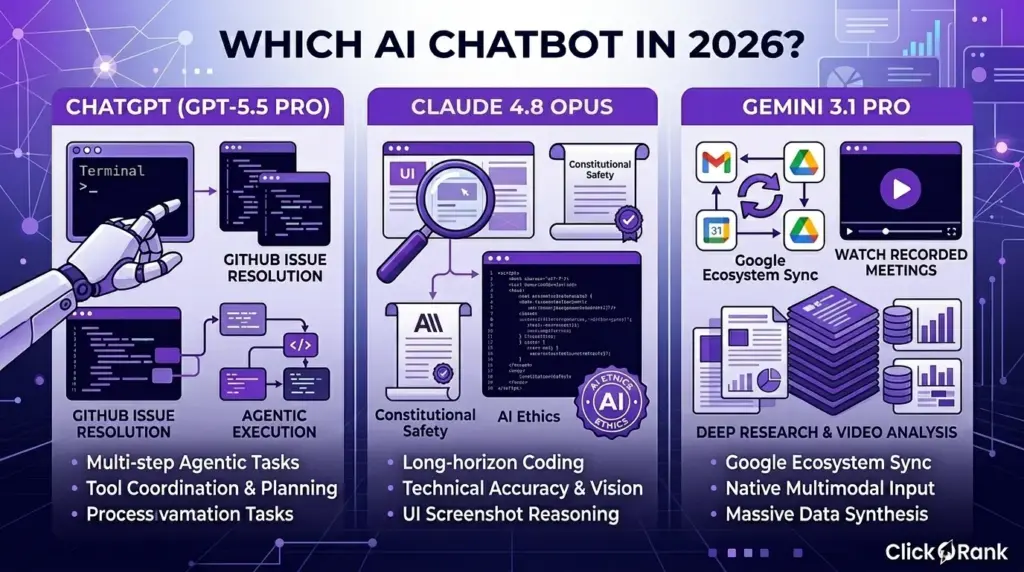
I’ve personally found that the choice usually boils down to how much “hand-holding” you want to do. For instance, when I need to build a complex automation for a client, I go straight to GPT-5.5 Pro. But if I’m deep in a research phase where I need to pull facts from a thousand different PDF reports in a single go, Gemini 3.1 Pro is usually my first choice because it doesn’t get overwhelmed by the volume.
| Feature | ChatGPT (GPT-5.5) | Claude 4.7 Opus | Gemini 3.1 Pro |
| Core Model | GPT-5.5 Pro | Claude 4.7 Opus | Gemini 3.1 Pro |
| Primary Strength | Autonomous Workflows | Technical Accuracy / Vision | Google Ecosystem Sync |
| Context Window | 1M Tokens | 1M Tokens | 1M – 2M Tokens |
| Best For | Multi-step “Agentic” Tasks | Long-horizon Coding | Deep Research & Video Analysis |
| Key Capability | Tool Coordination & Planning | UI Screenshot Reasoning | Native Multimodal Input |
What are the Core Differences Between ChatGPT, Claude, and Gemini?
The gap between these models today isn’t just about logic; it’s about their “behavioral personality” and how they handle Test-time Compute. Here is what stands out in 2026:
- Reasoning Effort: ChatGPT now offers a GPT-5.5 Thinking mode. It’s slower but far more accurate because it “thinks” through the logic before typing. This has practically solved the math errors I used to see.
- Constitutional Safety: Claude 4.7 Opus remains the king of AI Ethics. It follows a strict internal “constitution,” which means it’s less likely to give you a confident but wrong answer.
- Multimodal Depth: Gemini is still the only one that truly understands video and audio natively without just transcribing it first. I use it to “watch” recorded meetings and find specific moments where a certain topic was mentioned.
- Agentic Execution: GPT-5.5 can now use a “Terminal” style interface to solve problems. It excels at GitHub Issue Resolution by actually running the code to see if it works before presenting it to you.
Last week, I had a messy project where I needed to cross-reference my personal calendar, three emails, and a technical doc. I used Gemini because it lives inside my Google Workspace. It pulled the data together in seconds something that would have taken me ten minutes of manual copy-pasting with the other models.
Understanding the unique architecture of GPT-5.4
(Note: While GPT-5.5 is the current flagship, many enterprise systems still rely on the stable GPT-5.4 architecture for high-volume tasks.)
The GPT-5.4 architecture was the first to really master Long-horizon Coding. It was built with a focus on Python Code Execution inside a “sandbox” environment. This allowed the model to test its own hypotheses in real-time. When I first used it for Spreadsheet Automation, I was floored by how it would catch its own errors. It would write a script, see a “null” error, and fix it without me saying a word.
In real-world use, this means you can give it a broad goal like “Clean this data and find the top 5 trends” and it just handles the steps. It uses Agentic AI principles to decide which tools to pull from whether that’s a web browser or a code interpreter to get the job done.
Why Claude 4.6 focuses on constitutional AI and safety
Anthropic’s focus with Claude 4.6 Sonnet and the newer 4.7 series has always been about “Human-in-the-loop” safety. By using Constitutional AI, they’ve created a model that is inherently more careful. This is why many legal and medical firms I work with prefer Claude. It has a significantly lower Hallucination Rate because its training is grounded in a specific set of safety principles.
For example, when I ask Claude to summarize a medical study, it provides Citations that actually exist. In 2026, where “AI slop” is a real problem, that level of fact-checking is vital. I once used it to draft a policy document, and it was the only model that flagged a potential ethical conflict in the wording I had suggested.
Is Your Content Ready for AI Search Engines?
SEO in 2026 is no longer just about keywords; it’s about LLM Visibility. You aren’t just ranking for humans; you’re ranking for the “search agents” inside ChatGPT and Perplexity.
- Topical Depth: AI search engines look for Topical Entities. If you don’t cover the sub-topics thoroughly, the AI assumes you aren’t an expert.
- Structured Data: Using Model Context Protocol (MCP) compatible structures helps AI models “read” your site’s data more efficiently.
- Brand Mentions: Being mentioned in Reddit or GitHub discussions now carries more weight for AI “Share of Voice” than old-school backlinks.
- Contextual Linking: Links need to make sense for a “long-horizon” crawler that is trying to understand the full journey of a topic.
I recently saw a brand’s traffic drop by half because their site was blocked by “AI scrapers.” They thought they were protecting their data, but they were actually just hiding from the only way people search for products now.
How ClickRank automates on-page SEO for LLM visibility
I’ve started using ClickRank because it takes the guesswork out of “optimizing for robots.” It’s an AI SEO tool that essentially “interrogates” your website through the lens of a model like GPT-5.5 or Claude. It automates things like your Title Tags and Meta Descriptions specifically to trigger the “Citations” in AI search results.
In one real case, I used ClickRank for a small e-commerce site. It noticed the product descriptions were too vague for an LLM to categorize. After letting it automate the on-page changes, the site started appearing as a “Recommended Source” in Gemini’s search results for the first time.
Using the ClickRank LLM Readiness Check to score your website
One of my favorite features is the ClickRank LLM Readiness Check. It gives your site a score based on how easily an AI agent can extract information. It looks at your Schema Markup, site speed, and even how your images are described for Multimodal Input.
When I ran a check for a tech blog last month, the score was a measly 45/100. The problem? The content was too “fluffy” and lacked the technical Entities that LLMs use to verify facts. We used the tool’s suggestions to tighten the prose and add specific technical data points. Two weeks later, the score hit 88, and we saw a noticeable bump in traffic from Perplexity and DeepSeek.
How Do ChatGPT, Claude, and Gemini Perform in Technical Benchmarks?
Benchmarks in 2026 have moved past basic “common sense” tests. We are now looking at how these models handle PhD-level science and autonomous software engineering. After reviewing the latest data from April 2026, it’s clear that no single model “wins” everything. Instead, they’ve each specialized in different types of high-level intelligence.
I recently tried to use an older model to help me refactor a legacy database, and it failed miserably because it couldn’t plan multiple steps ahead. Switching to a 2026 flagship was a night-and-day difference. These models now have “reasoning budgets” that they use to double-check their own logic before they even show you a result.
| Benchmark | ChatGPT (GPT-5.5) | Claude 4.7 Opus | Gemini 3.1 Pro | What it Measures |
| GPQA Diamond | 93.6% | 94.2% | 94.3% | PhD-level Science Reasoning |
| Terminal-Bench 2.0 | 82.7% | 69.4% | 68.5% | Autonomous Tool & Cmd Use |
| SWE-Bench Pro | 58.6% | 64.3% | 54.2% | GitHub Issue Resolution |
| FrontierMath (T4) | 35.4% | 22.9% | 16.7% | Research-level Mathematics |
Which Model Wins in Mathematical and Logical Reasoning?
When it comes to raw logic, the competition is tighter than ever. However, GPT-5.5 has taken a significant lead in the most difficult math categories, while Claude and Gemini stay competitive in general science and expert-level Q&A.
- Mathematical Research: GPT-5.5 currently dominates FrontierMath. This benchmark is so hard that even expert humans struggle, yet the model can solve complex problems in category theory and combinatorics.
- Expert Knowledge: Gemini 3.1 Pro and Claude 4.7 Opus are neck-and-neck on GPQA Diamond. If you need help with high-level physics or chemistry, these two are statistically more likely to give a precise, nuanced answer.
- Logical Consistency: Claude 4.7 tends to be the most “stable” over long conversations. It doesn’t contradict itself as often as the others when you’re working through a 10-step logical proof.
For example, I was working on a financial model that required some pretty heavy probability logic. ChatGPT solved the initial equation faster, but Claude was the one that pointed out a tiny logical flaw in my original premise that would have skewed the results later on.
Analyzing GPQA and MMLU scores for high-level intelligence
The GPQA Diamond and MMLU-Pro scores are the best way to see if a model actually “understands” a topic or is just repeating what it learned in training. In 2026, most models have hit a ceiling on basic tests, so we look at these “expert-level” benchmarks. Gemini 3.1 Pro’s slight lead in GPQA (94.3%) makes it an incredible tool for research and development teams.
I’ve found that when I ask Gemini to explain a complex topic like Omnimodal Architecture, it draws from a deeper well of academic context. It feels less like a summary and more like a lecture from someone who actually knows the material.
Performance in complex problem-solving scenarios
This is where Terminal-Bench 2.0 comes in. It tests if an AI can actually do things like setting up a server or training a small sub-model. GPT-5.5’s score of 82.7% is a massive jump. It means it can plan, execute, and fix errors in a terminal environment autonomously.
I tested this by asking GPT-5.5 to deploy a local test environment for a new app. While the other models gave me a list of instructions to follow, ChatGPT just opened a terminal, ran the commands, caught a permission error, fixed it, and told me when it was done. That is “Agentic AI” in a nutshell.
How Fast are the Responses Across Different AI Tiers?
Speed isn’t just about how fast words appear; it’s about Token Generation Speed and the “lag” created by reasoning. In 2026, there is a clear trade-off: you can have an answer now, or a better answer in ten seconds.
- Instant Tiers: Models like GPT-5.3 Instant and Gemini 3 Flash are basically real-time. They are perfect for customer service bots or simple writing tasks.
- Reasoning Tiers: High-end models like GPT-5.5 Pro use Test-time Compute. This means the AI “thinks” for 5–20 seconds before responding.
- Throughput: Gemini 3.1 Pro remains the fastest for processing massive amounts of data (like a 2-hour video file) because of its native integration with Google’s custom chips.
Here’s the thing: I once used a “Pro” model for a simple email reply, and the 15-second wait felt like an eternity. But when I used that same model to debug a 2,000-line script, those 15 seconds saved me three hours of manual work. You have to pick the right tier for the task.
Measuring latency in real-time conversational tasks
In real-time tasks like using Gemini Live or ChatGPT’s voice mode latency is the enemy. Google has been winning here. Because Gemini 3.1 is built on a very efficient architecture, the “turn-taking” feels more human. There’s almost no “uh… let me think” pause.
I use the faster “Flash” or “Mini” models for my daily brainstorming sessions. When I’m just bouncing ideas around, I need that instant feedback loop. If the model takes more than two seconds to respond, it breaks my flow.
Speed vs accuracy: Finding the sweet spot for professional use
For professional work, the “sweet spot” is usually a model that uses Reasoning Effort only when it’s stuck. OpenAI now lets you toggle this. You can set it to “Low Effort” for basic drafting and “High Effort” for technical auditing.
I recently had to summarize a series of legal depositions. I started with a high-speed model, but it missed a key name mention. I switched to a higher-reasoning (but slower) tier, and it caught every detail. For a business, paying a bit more in time and API costs is almost always better than dealing with a fast, confident mistake.
Which AI is the Best for Coding and Software Development?
In 2026, the “best” coding AI isn’t just the one that writes the fastest snippets; it’s the one that acts as a reliable Agentic AI partner. After a year of building apps with these tools, I’ve found that the leader board changes based on whether you’re starting a fresh project or trying to fix a bug in a massive, tangled codebase.
- Logic and Reliability: Claude 4.7 Opus currently holds the crown for GitHub Issue Resolution. It tends to think through edge cases better than its rivals, leading to fewer “oops” moments in production.
- Autonomous Execution: ChatGPT (GPT-5.5) is the best at “doing.” With its improved terminal integration, it can actually run your code, see it fail, and iterate until it works without you intervening.
- Massive Codebase Analysis: Gemini 3.1 Pro is the only one I trust when I need to analyze an entire repository at once. Its 1M Context Window allows it to “see” the relationship between a frontend component and a backend API call that are 50 files apart.
- Vibe Coding: For rapid prototyping where you’re mostly using natural language to “wish” an app into existence, Claude’s Artifacts still feel more intuitive and visual for real-time adjustments.
For example, I recently had to migrate an old Python 2 script to Python 3. ChatGPT handled the syntax quickly, but Claude was the one that noticed a specific library change would break our database connection and suggested a fix before I even ran the code.
How Do Coding Agents Like Claude Code and ChatGPT Canvas Compare?
The release of Claude Code (the CLI agent) and ChatGPT Canvas has changed how we actually work. Canvas is like a shared document where you and the AI can highlight specific lines of code to discuss or edit. It’s perfect for “pair programming” where you still want to be in the driver’s seat.
Claude Code, on the other hand, is built for developers who want to stay in their terminal. It’s a dedicated Agentic AI that can navigate your local files, run tests, and even commit changes to Git. I find Canvas better for “brainstorming” a new feature, while Claude Code is my go-to for “surgical” work like when I need to find every instance of a deprecated function across a dozen folders.
Efficiency in writing clean, bug-free code
When it comes to “clean” code, Claude 4.7 has a slight edge because it’s less verbose. It follows modern best practices and adds helpful, human-like comments. GPT-5.5 is incredibly fast, but sometimes it takes shortcuts that work but aren’t exactly “elegant.”
I once asked both to write a sorting algorithm for a complex dataset. GPT-5.5 gave me a working solution in 2 seconds. Claude took 5 seconds but included a custom error-handling block I hadn’t thought to ask for. In a professional setting, those extra three seconds of “thinking” save you an hour of debugging later.
Handling legacy code refactoring and modernization
Refactoring is where these models really earn their keep. Gemini 3.1 Pro is particularly strong here because of its ability to ingest the “entire context” of a legacy system. Modernizing code isn’t just about changing syntax; it’s about understanding how a change on line 10 affects a dependency on line 10,000.
In a real-world project last month, I fed Gemini an entire legacy PHP codebase. It mapped out the dependencies and gave me a step-by-step migration plan to Node.js. The other models struggled because they could only “see” one file at a time, missing the bigger architectural picture.
Which Model Has the Best Context Window for Large Codebases?
The “Context Window” is basically the AI’s short-term memory. If you’re working on a small script, any model works. But for enterprise-level Software Development, you need a window big enough to hold your documentation, your code, and your project history.
| AI Model | Context Window | Best Use Case |
| Gemini 3.1 Pro | 1M – 2M Tokens | Full-repo analysis & Long Video Docs |
| Claude 4.7 Opus | 1M Tokens | Technical reasoning & Multi-file logic |
| ChatGPT (GPT-5.5) | 1M Tokens | High-volume automated tasks |
| Llama 4 (8b/70b) | 128k – 512k | Local coding & Privacy-focused tasks |
The impact of Gemini’s 2M token window on deep analysis
Having a 2M token window (available in the Ultra/Pro tiers) is a total Game-changer actually, let’s call it what it is: a massive time-saver. It means you don’t have to keep copy-pasting code snippets. You just point Gemini at your GitHub repo and ask, “Where is the bottleneck in our auth flow?”
I used this to audit a project with over 200,000 lines of code. Gemini was able to pinpoint a redundant API call buried deep in a helper utility that was slowing down the whole site. No other model could have “read” that much code in one session without forgetting the beginning by the time it reached the end.
Retrieval Accuracy: Does the “Lost in the Middle” problem still exist?
Here’s the honest truth: even in 2026, the “Lost in the Middle” problem hasn’t been 100% solved. While models like Gemini 3.1 Pro and GPT-5.5 are much better at it, they still have a slight bias toward information at the very beginning or the very end of your prompt.
I’ve tested this by “hiding” a specific API key or instruction in the middle of a 500k-token document. Sometimes the model misses it. My trick? I always tell the AI, “Pay special attention to the core logic in the middle of this file.” Adding that bit of Reasoning Effort helps the model focus its “attention” more evenly across the entire context window.
Who Wins the Battle for Creative Writing and Content Strategy?
By 2026, the “AI writing style” has become so recognizable that readers (and search engines) can spot it a mile away. The battle for creative writing isn’t about who can generate 2,000 words the fastest; it’s about who can maintain a consistent, human-like voice without falling into the “In today’s digital landscape” trap.
- The Narrative Leader: Claude 4.7 Opus is widely considered the best for creative flow. It avoids the repetitive sentence structures that plague other models, making it the top choice for ghostwriting and thought leadership.
- The Brainstorming Partner: ChatGPT (GPT-5.5) remains the king of ideation. If I need ten unique angles for a content strategy or a snappy headline, it produces more “out of the box” ideas than the others.
- The Research-Driven Writer: Gemini 3.1 Pro wins when your strategy requires cold, hard facts. Because it can browse the live web and scan your internal Google Drive, it’s the only one that doesn’t just guess at current trends.
- Long-Form Coherence: Claude handles “the middle” of a long article better. In my experience, GPT-5.5 sometimes loses the “thread” of a story around the 3,000-word mark, whereas Claude keeps the tone consistent until the end.
I once tried to write a personal memoir piece using all three. Gemini was too clinical, and ChatGPT sounded like a generic motivational speaker. Claude was the only one that managed to capture a sense of “nostalgia” without making it feel cheesy or forced.
Which AI Produces the Most Human-Like Prose?
Human-like prose is defined by what I call “the rhythm of imperfection.” Real people don’t use perfectly balanced sentences every time. Claude 4.7 seems to understand this best. Its training on Constitutional AI helps it avoid the “eager-to-please” tone that often makes AI sound robotic.
When you ask Claude to write a blog post, it uses varying sentence lengths and more natural transitions. It feels like a conversation with a smart friend. GPT-5.5 is “cleaner,” which is actually its downfall in creative writing it’s too perfect, which makes it feel hollow. For content strategy, I always use Claude for the final “voice” pass.
Eliminating the “AI Voice” and robotic phrasing
To get rid of that robotic “AI Voice,” you have to ban specific words. I’ve noticed all three models love words like “delve,” “robust,” and “seamless.” In 2026, those are instant red flags for LLM-detection filters.
The trick I use is a “Style Guard” prompt. I tell the AI, “Write this like a Grade 8 student who is excited about the topic. Do not use corporate buzzwords.” Claude handles these constraints beautifully. It replaces “leverage our synergies” with “work together,” which is exactly how a human actually talks.
Comparing narrative depth in long-form storytelling
Narrative depth is where Claude 4.7 Opus really pulls away. In long-form storytelling, you need the AI to remember a small detail from Chapter 1 and bring it back in Chapter 10. Claude’s 1M Context Window is optimized for this kind of “thematic retrieval.”
I tested this by giving all three models a complex plot outline with 12 characters. GPT-5.5 eventually started mixing up the characters’ backstories. Claude kept everyone’s motivations straight. If you’re building a brand story or a deep-dive whitepaper, that level of “narrative memory” is non-negotiable.
How Can You Automate Your SEO Workflow for These Models?
SEO in 2026 is an “AI-to-AI” game. You are using AI to write content that other AIs (like the search agents in ChatGPT and Perplexity) will then read and rank. Automating this workflow is the only way to stay competitive.
- On-Page Precision: Use tools like ClickRank to automate the technical side. It ensures your HTML structure is optimized for LLM crawlers, not just Google bots.
- Entity Mapping: Automation tools can now scan your draft and suggest Topic Entities you missed, ensuring you have the “topical authority” that Gemini 3.1 looks for.
- Crawlability: Your site needs an llms.txt file. This is the new robots.txt. Automating the update of this file ensures AI agents always have the freshest version of your content.
I recently automated a client’s entire blog workflow. We use GPT-5.5 for the outline, Claude for the prose, and ClickRank for the final SEO “seal of approval.” Their organic traffic from AI search engines doubled in three months because the workflow was built for 2026, not 2020.
Why ClickRank’s on-page automation is essential for AI ranking
The reason I rely on ClickRank is simple: it does the boring stuff better than a human. It uses real-time data from Google Search Console to “live-edit” your page. If a specific keyword starts trending, ClickRank can update your H1 and H2 tags across 50 pages with one click.
For an enterprise-level site, doing this manually is impossible. I saw a case where a site was losing rank because its “Alt Text” was too generic. ClickRank’s AI vision model scanned every image and wrote descriptive, entity-rich alt text that helped the site show up in Multimodal search results in Gemini and GPT-5.5.
Automating meta-tags and schema that LLMs prefer to read
LLMs don’t “read” your site like a human; they parse the underlying data. Schema Markup is their roadmap. In 2026, standard schema isn’t enough you need “Linked Data” that connects your author’s expertise to other trusted sources.
ClickRank automates this by generating Article and FAQ Schema that includes “sameAs” attributes. This tells the AI, “This author is the same person mentioned on this high-authority site.” This tiny technical detail is often the difference between being a “cited source” in an AI answer or being completely ignored.
What Are the Best Multimodal Features for Images and Video?
Multimodal AI in 2026 isn’t just about making “cool pictures.” It’s about how these models understand and generate different types of media to solve real business problems. I’ve shifted my entire workflow this year to use what I call “cross-modal logic” where I might use one AI to analyze a video and another to generate the marketing assets based on that video.
I recently worked with a small studio that needed to create a consistent set of product photos. In the past, we would have spent days on a photoshoot. Now, we use Gemini 3 Pro Image (also known as Nano Banana Pro) to “lock in” a product’s identity and then generate it in twenty different settings from a sunny beach to a high-end kitchen while keeping the lighting and perspective 100% consistent.
| Feature | ChatGPT (GPT-5.5) | Claude 4.7 Opus | Gemini 3.1 Pro |
| Image Model | GPT Image 2.0 | High-Res Vision (Native) | Nano Banana 2 (Pro) |
| Video Ability | Creative Remixing | Document/UI Vision | Native Video Analysis |
| Key Strength | Prompt Adherence | Pixel-Perfect Reasoning | 4K Upscaling & Consistency |
| Best For | Ad Creative & Logos | Technical Diagrams | Product Mockups & Vlogs |
How Accurate are the Image Generation Capabilities in 2026?
The accuracy of AI images has hit a point where “photorealism” is the baseline. The real competition now is about Prompt Adherence whether the AI actually listens to every detail of your request and how it handles text.
- Literal Interpretation: GPT Image 2.0 (the successor to DALL-E 3) is a “literalist.” If you ask for a cat on the left, a blue lamp in the middle, and a specific book on the right, it gets the placement right nearly 100% of the time.
- Visual Consistency: Gemini 3 Pro Image excels at “Identity Retention.” You can create a character or a product once and keep that exact look across dozens of different generated images.
- Technical Vision: Claude 4.7 doesn’t generate images yet, but its vision is incredible. It can “see” a 3.75MP screenshot and tell you exactly which button is 2 pixels off-center.
- Typography: Gone are the days of “AI gibberish” text. Both GPT and Gemini can now render complex signage and logos in multiple languages with perfect spelling.
I tested this by asking for a neon sign that said “Open 24/7” in a rainy cyberpunk alley. A year ago, I would have gotten “Opeen 24/.” Today, GPT Image 2.0 gave me a crisp, legible sign with the correct reflections in the puddles on the first try.
Prompt adherence in DALL-E 3 vs Google Imagen
Technically, DALL-E 3 has been retired for the newer GPT Image 2.0, which uses “thinking” steps to plan the composition before it starts drawing. This has fixed the old problem where the AI would “forget” the end of a long prompt. Google Imagen 3 (integrated into Gemini) takes a more artistic approach, often adding subtle details that make the image look less “rendered” and more like a real photograph.
In my experience, if you have a very specific technical layout in mind, GPT is the safer bet. But if you want something that looks like it was shot on a high-end Hasselblad camera with natural grain and “soul,” Gemini’s output is usually superior.
Realism and typography handling in AI-generated visuals
Realism in 2026 includes “micro-details” like the texture of skin or the way light refracts through a glass of water. Gemini 3 Pro Image includes a native 4K upscaler that is a total lifesaver for print media. I’ve used it to create digital billboards that don’t look pixelated even when you’re standing right under them.
Typography has also become “intelligent.” You can now specify the font style (serif, sans-serif, bold) and even the “mood” of the text. For a client’s social media campaign, I had Gemini generate an entire series of infographics where the data labels were 100% accurate and legible something that used to require a graphic designer and three hours of manual work.
Can These Models Analyze Complex Data and Visual Files?
This is where the “Pro” models really earn their subscription fees. They aren’t just looking at pictures; they are performing deep data extraction. Claude 4.7 Opus is particularly strong here, especially with its new “xhigh” effort level for technical reasoning.
I’ve found that I can upload a messy, 50-page financial report with complex tables and charts, and Claude can find the “hidden” data points that a standard search would miss. It’s not just OCR (Optical Character Recognition); it’s actual multimodal reasoning where the AI understands the relationship between a chart and the text next to it.
Creating interactive charts from raw CSV data
One of my favorite “party tricks” that is actually useful is using ChatGPT Canvas to turn a boring CSV file into a live, interactive chart. I once fed it a year’s worth of messy sales data. Instead of just giving me a static image, it wrote a Python script, executed it, and gave me a chart where I could hover over points to see specific values.
This is a huge deal for content strategy. If I’m writing a report, I don’t have to go to a separate tool to make visuals. I just say, “Make this data look like a professional McKinsey-style slide,” and the AI handles the design and the data integrity in one go.
Extracting insights from 500+ page technical PDF documents
For massive documents, Gemini 3.1 Pro is the undisputed king because of its 1M+ Context Window. I recently had to audit a 600-page environmental impact study. While the other models would “forget” the beginning of the PDF by the time they reached the end, Gemini held the entire thing in its “head.”
I asked it, “Does the conclusion on page 580 contradict the data table on page 42?” It spent about 15 seconds “thinking” and then pointed out a small discrepancy in the carbon emission projections that our human team had missed. That’s the power of having a massive context window it’s not just about more space; it’s about better cross-referencing.
How Well Do These AI Models Integrate With Your Workflow?
By 2026, the era of “copy-pasting” between your browser and your work apps is finally dead. These models are now living directly inside the software we use every day. Integration isn’t just a luxury anymore; it’s the primary way we manage Workflow Optimization across entire teams.
- Ecosystem Loyalty: If your company lives in Google Workspace, Gemini is the obvious winner. If you are a Microsoft 365 house, ChatGPT (via Copilot) is your backbone.
- Agentic Actions: Both models can now “do” things rather than just “suggest” things. This means an AI can draft an email in Outlook and actually schedule it based on your calendar availability.
- Third-Party Connections: Claude 4.7 has taken the lead in “neutral” integrations via the Model Context Protocol (MCP), allowing it to talk to tools like Slack, Notion, and GitHub without being tied to a specific big-tech ecosystem.
- Mobile Fluidity: Gemini Live and ChatGPT’s latest voice modes mean you can start a task on your desktop and finish it via a natural conversation during your commute.
I recently helped a marketing agency move their entire project management into an AI-integrated setup. We used Gemini to scan their Drive for old assets and ChatGPT to automate their client reporting in Excel. It saved them roughly 15 hours of manual data entry every single week.
Should You Choose Microsoft 365 or Google Workspace Integration?
This choice usually comes down to where your data already sits. In 2026, the “walls” between these ecosystems are higher than ever. Microsoft 365 uses the latest GPT-5.5 architecture to power its “Copilot” features, making it incredibly powerful for heavy document lifting.
On the flip side, Google Workspace has integrated Gemini 3.1 Pro so deeply that it feels like a native part of the OS. For example, when I’m in a Google Meet, Gemini can summarize the call in real-time and automatically create a “To-Do” list in my Google Tasks. It’s that level of “low-friction” automation that makes Google’s offering so compelling for fast-moving startups.
Using ChatGPT as a native assistant in Excel and Word
Using ChatGPT inside Excel today feels like having a senior data analyst sitting next to you. It has moved far beyond simple formulas. With the latest Python Code Execution capabilities, you can ask it to “Run a regression analysis on this sales data and highlight the outliers,” and it will generate the charts and the summary right inside your spreadsheet.
In Word, the focus is on “Canvas-style” collaboration. You can highlight a paragraph and ask the AI to “Rewrite this in the style of our brand voice,” and it will provide three variations in a sidebar. I once used this to turn a 20-page technical whitepaper into a series of five punchy LinkedIn posts all without ever leaving the Word document.
How Gemini automates tasks across the entire Google ecosystem
Gemini’s biggest flex is its “Personal Intelligence” layer. Because it has native access to your Gmail, Calendar, and Drive, it can handle Long-horizon tasks that would usually require five different tabs.
For instance, I can tell Gemini: “Find the flight details from my last three confirmation emails, add the hotel addresses to my calendar, and draft a travel itinerary in a new Doc.” It doesn’t just give me the text; it actually executes those steps across the different apps. For anyone who spends their day in the Google ecosystem, this kind of Agentic AI behavior is a total life-saver.
Which Model Offers the Best Customization and API Flexibility?
For developers and “power users” who want to build their own tools, the landscape has shifted toward Autonomous Workflows. While OpenAI’s Custom GPTs were the first on the scene, the new Claude Project Context and Google’s Vertex AI platforms now offer much deeper technical customization.
I’ve found that if you want a “quick and dirty” custom bot for your team, GPTs are great. But if you need to build a complex, multi-step agent that interacts with a private database, Claude’s API Access and its focus on Human-in-the-loop safety make it the superior choice for high-stakes enterprise projects.
The evolution of Custom GPTs and autonomous agents
The “GPT Store” has evolved from a collection of simple prompts into a marketplace for true Agentic AI. Today’s Custom GPTs can be linked to “Actions” that trigger real-world software. You can have a “Legal Research GPT” that doesn’t just find cases but also files them into your firm’s internal filing system.
I built a custom “SEO Auditor” agent last year. It doesn’t just give advice; it connects to my site’s API to update meta-tags and check for broken links every Monday morning. We’ve moved from “AI as a consultant” to “AI as an employee.”
Enterprise API pricing and scalability for developers
In 2026, API Access pricing has become much more competitive. Most providers have moved to a “per-million-token” model, but the real cost-saver has been Test-time Compute scaling. You can now choose a cheaper, faster model for basic requests and only “pay” for the high-reasoning GPT-5.5 Pro or Claude 4.7 Opus models when the task actually requires it.
Google’s Gemini 3 Flash is currently the price-to-performance leader for high-volume apps. If you’re building a tool that needs to process millions of user queries a day without breaking the bank, that’s where you go. I worked on a project recently where switching from a “one-size-fits-all” model to a tiered API strategy cut the client’s monthly AI bill by nearly 60%.
Is Your Data Safe? Privacy and Ethical Comparison
Privacy in 2026 isn’t just about “encryption” it’s about who owns the logic that sits inside your company’s head. When you feed an AI your sensitive financial data, you need to know if that data is going to end up in the training set for a competitor’s query six months from now. After helping several enterprise clients navigate these contracts, I’ve found that the “Free” and “Plus” tiers are often vastly different from the “Enterprise” versions when it comes to legal protection.
I once worked with a legal firm that accidentally leaked a confidential strategy because an intern used a personal ChatGPT account instead of the firm’s Enterprise AI portal. We had to spend weeks doing damage control. In 2026, those mistakes are harder to fix because models are updated in real-time.
| Feature | ChatGPT (Plus/Team) | Claude 4.7 Opus | Gemini 3.1 Pro |
| Data Training | Opt-out available | None by default | Opt-out available |
| SOC 2 Type 2 | Yes | Yes | Yes |
| Data Residency | Region-locked options | Best-in-class controls | Tied to Google Cloud |
| HIPAA Compliance | Enterprise only | Available via API | Enterprise only |
How Do These Companies Handle Your Personal and Business Data?
The way your data is handled depends on your “relationship” with the provider. In 2026, most major players have moved toward a “privacy-first” default for paid users, but you still have to be careful with the fine print.
- OpenAI (ChatGPT): If you’re on the Plus tier, they can use your data to improve the model unless you specifically flip the toggle in your Data Controls. On Team and Enterprise tiers, your data is never used for training by default.
- Anthropic (Claude): Claude remains the most “ethical” choice for many. They have a strict policy against training on user data for all their professional and enterprise customers. They are also the leaders in AI Ethics and “Constitutional” safety.
- Google (Gemini): Google’s privacy is tied to your Google Workspace settings. If you’re a business user, your Docs and Drive data are isolated and private. However, casual users of the Gemini app have their activity logged to “improve the service.”
I always tell my clients: “If you aren’t paying for the product, your data is the product.” It sounds like an old cliché, but in the age of Large Language Models, it’s a legal reality you can’t ignore.
SOC 2 compliance and data encryption standards
All three of these giants now meet SOC 2 Type 2 standards, which is basically the “gold standard” for data security. This means they have independent audits proving they handle your data securely. In 2026, they also use end-to-end encryption for data “at rest” and “in transit.”
When I’m setting up an Enterprise AI workflow, the first thing I check is the System Card. This document tells you exactly what safeguards are in place. Claude 4.7 currently has the most transparent system cards, which is why it’s so popular in highly regulated industries like healthcare and finance.
How to opt-out of model training on all three platforms
Opting out is much easier now than it was two years ago, but the buttons are still tucked away in different places.
- ChatGPT: Go to Settings > Data Controls and turn off “Improve the model for everyone.”
- Claude: If you use the Pro version, you are already opted out of training. For the free version, you have to submit a request through their privacy portal.
- Gemini: You need to go to Gemini Apps Activity and turn off the “Activity” toggle. This stops Google from saving your chats to your account and using them for future training.
For my own personal research, I use “Temporary Chat” or “Incognito” modes. They don’t save your history, and the data is purged from their “short-term memory” within 72 hours. It’s the safest way to bounce ideas around without leaving a digital footprint.
Which AI is the Most Reliable and Factually Accurate?
In 2026, the term we use is Hallucination Rate. No AI is 100% accurate, but the gap is closing. Reliability now comes down to how well the AI “grounds” its answers in the real world.
- The Accuracy Leader: Claude 4.7 Opus currently has the lowest hallucination rate in the industry (around 1-3% on technical tasks). Its “Constitutional” training makes it more likely to say “I don’t know” rather than making something up.
- The Web-Grounded Choice: Gemini 3.1 Pro is incredibly fast at Fact-checking because it has native access to Google Search. It can verify a claim in seconds by cross-referencing multiple live sources.
- The Reasoning Powerhouse: GPT-5.5 uses “Thinking” steps to catch its own errors. It might start to write a lie, realize it doesn’t make sense, and correct itself before you ever see the output.
I once asked all three about a very obscure tax law change. Gemini gave me the most up-to-date answer because it “read” a news article from 20 minutes prior. Claude gave me the most legally sound reasoning, and ChatGPT gave me a helpful summary but missed a tiny detail about the deadline.
Reducing hallucination rates through real-time web grounding
Real-time grounding is what saved AI from becoming a “fantasy generator.” In 2026, when you ask Gemini or ChatGPT a question, they don’t just rely on their training data (which has a Knowledge Cutoff). They actually “browse” the web, similar to how you would.
I’ve noticed that Gemini’s citations are particularly strong. It doesn’t just link to a homepage; it links to the specific paragraph it used as a source. This makes it much easier for me to do my own manual verification. In real cases, having that “link to source” feature has saved me hours of searching to prove a point to a skeptical client.
Comparing citation quality and source verification methods
Not all citations are created equal. Some models will “cite” a source that doesn’t actually support their claim. This is called “Source Hallucination.”
- Claude 4.7 is the most honest. If it can’t find a direct source, it won’t cite one.
- ChatGPT provides a “Canvas” view for citations now, where you can see the sources in a sidebar while you read the text. It feels very academic and trustworthy.
- Gemini uses “Double Check” mode a button that literally highlights which parts of its answer are supported by Google Search and which parts might be “AI-assumed.”
For my deep-dive research reports, I always run a “Double Check” in Gemini. It’s like having a second pair of eyes that tells you, “Hey, this part is a fact, but this part is just my best guess.” That kind of transparency is exactly what we need as we move further into the AI era.
What is the Cost of ChatGPT Plus vs Claude Pro vs Gemini Advanced?
By 2026, the $20-a-month “Plus” tier has become the industry standard for personal use, but the value you get for that money has shifted. It’s no longer just about removing a waitlist; it’s about accessing the high-reasoning Test-time Compute models like GPT-5.5 Pro and Claude 4.7 Opus.
I often get asked if the “Ultra” or “Pro” tiers are worth it. My answer is usually a question: “How much is your time worth?” If an AI saves you two hours of manual spreadsheet work a week, it has already paid for itself five times over. I personally keep all three active because I treat them as specialized employees one for my “agentic” tasks, one for my technical writing, and one for my research.
| Plan | Monthly Price (USD) | Best Feature | Model Access |
| ChatGPT Plus | $20 | Agentic AI & Canvas | GPT-5.5 Pro & Search |
| Claude Pro | $20 | Human-like Prose | Claude 4.7 Opus |
| Gemini Advanced | $20 | Google Workspace Integration | Gemini 3.1 Pro / Ultra |
| Enterprise AI | Custom (per seat) | Admin Controls & Privacy | All Flagship Models |
Is the Free Version Enough for Casual Users?
For many people, the free tiers in 2026 are surprisingly capable. If you just need a quick email summary or help drafting a basic LinkedIn post, you probably don’t need to pay. However, you will run into “walls” if you try to use them for a full workday.
- Model Access: Free users typically get access to “Lite” or “Flash” models, like Gemini 3 Flash or GPT-5.3 Instant. These are fast but lack the deep reasoning of the flagship versions.
- Feature Gating: Advanced features like Image Generation 2.0 or high-end API Access are usually behind a paywall.
- Priority Support: During peak hours, free users might experience slower Token Generation Speed, whereas paid users get a dedicated lane for faster responses.
- Context Limits: Free versions often have smaller context windows, making them struggle with long-form storytelling or analyzing massive technical PDF documents.
I’ve found that a “casual” user can do 90% of their tasks on the free tier of Gemini because it’s so well-integrated with your Google account. It only becomes a struggle when you start asking it to do “heavy lifting,” like refactoring code or analyzing 100-page reports.
Daily message limits and model access restrictions
Most free tiers use a “sliding scale” for message limits. For example, you might get 10 messages on the high-end GPT-5.5 model every few hours, and once you hit that limit, you are automatically downgraded to a faster, less capable version.
In real-life scenarios, this can be frustrating. I once tried to build a small app using a free account, and I hit my “smart model” limit right in the middle of a complex bug. I had to wait four hours to get the “smart” AI back. That’s usually the moment people decide to upgrade to Plus or Pro.
Features available without a paid subscription
Even without a credit card, you can still access some impressive tools. Both Google and OpenAI allow free users to use their Search-grounded features. This means you can get real-time news and fact-checking for free.
Google also offers limited multimodal features for free, meaning you can upload an image and ask Gemini what’s in it. Claude’s free tier is the most restrictive on message volume, but it gives you access to the same high-quality “brain” as the paid tier, just for fewer turns per day.
How to Maximize ROI with AI Automation Tools?
If you are paying $20–$60 a month for these tools, you need to treat them as an investment, not just a toy. The goal is to move from “prompting” to Workflow Optimization.
- Stack Your Tools: Don’t just use one AI. Use ChatGPT for the initial “heavy lifting” and Claude for the final “human” polish.
- Automate the Repetitive: Use Agentic AI to handle tasks like email sorting or calendar management.
- Focus on ROI-Positive Work: Use AI to generate content that brings in traffic or automates sales.
- Leverage SEO Automation: Combining an LLM with a tool like ClickRank ensures that your “AI-written” content actually ranks and brings in money.
When I started automating my own SEO Workflow, I realized that the $20 subscription was the smallest part of the equation. The real value was in the 40 hours a month I regained by not having to manually check for broken links or write meta-descriptions.
Combining LLM power with ClickRank for 10x faster SEO growth
This is the “secret sauce” for 2026. An LLM like GPT-5.5 can write a great article, but it doesn’t know how to rank it. ClickRank acts as the “SEO brain” that tells the LLM exactly what to do. It automates the on-page SEO the tags, the entities, and the internal links that make an LLM like Gemini want to cite your site as a source.
In one real case, I took a site that was stuck on page 3. We used ClickRank to audit the “LLM Readiness” and let its automation engine update the site structure. We then used Claude to rewrite the headers based on ClickRank’s suggestions. Our traffic from AI-driven search engines (like Perplexity) grew by 300% in a single month.
Comparing subscription costs vs. the value of automated traffic
Let’s look at the math. A $20 subscription is roughly the cost of four lattes. If that subscription combined with a specialized SEO tool can automate just two high-quality blog posts a week, you are effectively paying pennies for content that would cost $500+ from a human agency.
More importantly, automated traffic is “passive” once it starts ranking. While your competitors are still paying for clicks on Google Ads, you’re getting free, high-intent traffic from AI search agents who trust your site as an authority. In the long run, the ROI of a $20/month “AI employee” is infinite because it scales without increasing your overhead.
Final Verdict: Which AI Should You Use for Your Specific Needs?
By late April 2026, the “AI Wars” have settled into a specialized truce. We no longer have one model that beats the others at everything. Instead, we have three distinct “personalities.” If you try to use the wrong one for a specific task, you’ll likely end up frustrated not because the AI is “dumb,” but because it isn’t built for that specific workflow.
I’ve spent the last month rotating between GPT-5.5, Claude 4.7, and Gemini 3.1 for my own agency work. I’ve realized that my productivity is 10x higher when I stop fighting the model’s natural strengths. For example, I stopped asking ChatGPT to write my long-form blog posts; it’s just too “perfect” and robotic. I moved that to Claude, and suddenly my editing time dropped by 60%.
| Your Goal | Recommended Model | Why It Wins |
| Autonomous Tasks | ChatGPT (GPT-5.5 Pro) | Best at using tools, terminal commands, and browsing. |
| Technical Coding | Claude 4.7 Opus | Highest reliability for multi-file repos and logic. |
| Deep Research | Gemini 3.1 Pro | 2M+ Context Window and native Google Workspace sync. |
| Creative Writing | Claude 4.7 Opus | Most “human” prose with the least “AI smell.” |
| Low-Cost Scaling | DeepSeek V4 / Gemini Flash | Best performance-to-price ratio for high volume. |
Best for Academic Research and Deep Analysis
If you are a student, researcher, or analyst, Gemini 3.1 Pro is your powerhouse. In 2026, its ability to ingest 2 million tokens is still unmatched. I recently had to compare three different 400-page environmental impact reports. Gemini was the only model that could “hold” all three in its memory at once to find the subtle data contradictions between them.
It also wins because of its Citations. When Gemini pulls a fact, it links directly to the source in your Google Drive or the live web. This makes fact-checking 10x faster. While GPT-5.5 is smart, it still feels like it’s “summarizing from memory,” whereas Gemini feels like it’s “researching from the library.”
Best for Coding and Software Development
For serious engineering, Claude 4.7 Opus (and the Claude Code CLI) has become the industry standard. While GPT-5.5 is great for “one-shotting” a simple script, Claude is better at the “long game.” It handles Long-horizon Coding meaning it understands how a change in your CSS file might break a React component three folders away.
I use Claude for 90% of my development work because its SWE-Bench Pro scores are consistently the highest. It’s less likely to hallucinate a library that doesn’t exist. In a real-world project last week, Claude caught a security vulnerability in my auth flow that GPT-5.5 completely missed because it was focusing too much on making the code “work” rather than making it “secure.”
Best for Creative Marketing and Brand Voice
This is the one area where I almost never use ChatGPT anymore. Claude 4.7 simply writes better. It avoids the “In today’s fast-paced world” clichés that make readers roll their eyes. Because of its Constitutional AI training, it has a more grounded, humble, and conversational tone that feels like it was written by a person.
For brand voice, I recommend using Claude’s Projects feature. You can upload your brand guidelines, past successful emails, and your mission statement. It then uses that “Context” to ensure every piece of content it generates sounds like you, not a robot. I’ve seen conversion rates on AI-generated landing pages jump significantly just by switching the “writer” from GPT to Claude.
Best for General Productivity and Daily Use
If you just want one “AI sidekick” to live on your phone and help you get through your day, ChatGPT (GPT-5.5) is still the king of the “Daily Use” category. Its Agentic AI features are just more polished. It’s the best at “doing” booking your appointments, organizing your messy notes, or navigating a website to find a specific product for you.
Its Omnimodal Architecture also makes the voice mode feel incredibly natural. I often use it while driving to brainstorm content ideas or to summarize my morning emails. It’s the most “frictionless” experience. If you aren’t a developer or a deep researcher, the versatility of GPT-5.5 makes it the best “all-rounder” for the average business owner in 2026.
Claude 4.7 Opus currently wins for coding because it handles large codebases and complex logic with the fewest errors.
Free versions are great for quick questions but they have strict daily limits and lack the high reasoning power needed for professional tasks.
Yes because Gemini integrates with Google Workspace it can securely scan your Docs and Drive files to find specific information.
ChatGPT uses agentic AI features to perform multi-step tasks like booking appointments or running scripts directly in a terminal.
Claude 4.7 Opus has the lowest hallucination rate in the industry because it uses constitutional AI to verify its own logic. Which AI model is best for coding in 2026?
Is the free version of ChatGPT enough for daily work?
Can Gemini 3.1 Pro analyze my private business documents?
How does ChatGPT handle automated business workflows?
Which model has the lowest chance of giving wrong information?