A professional SEO client report secures long term agency retention by connecting organic search performance directly to bottom line business revenue. Corporate decision makers demand immediate, clear proof of business growth and conversion value instead of browsing through superficial vanity metrics. Sending an exhausting forty-page performance document packed with raw data exports and dense technical jargon usually pushes confused marketing managers to cancel their monthly retainer contracts completely.
Tracking search visibility in 2026 demands that agencies evaluate organic brand citation frequency and answer inclusion rates inside automated AI Overviews and generative discovery engines. Algorithms evolve constantly. Integrating automated content optimization tools like ClickRank allows technical marketing teams to audit on-page asset health, resolve critical crawl errors, and maintain total website readiness for the strict data extraction processes used by modern LLM indexing models.
Demonstrating a clear return on investment requires marketing teams to implement precise multi-touch conversion attribution models within their primary Google Analytics dashboards. Traffic volume means nothing without sales. Isolating branded keywords from non-branded search trends allows experienced marketing managers to accurately analyze key event rates, monitor average page engagement time, and map long-term organic revenue growth directly onto a corporate financial pipeline.
Automating your agency reporting workflow through white-label Looker Studio dashboards eliminates dozens of hours spent on tedious manual data entry at the end of every monthly reporting cycle. Data accuracy builds authority. Presenting a punchy executive summary backed by clean competitor benchmarking data easily converts a retrospective performance export into an actionable, forward-looking strategic roadmap that guides next month’s optimization sprints.
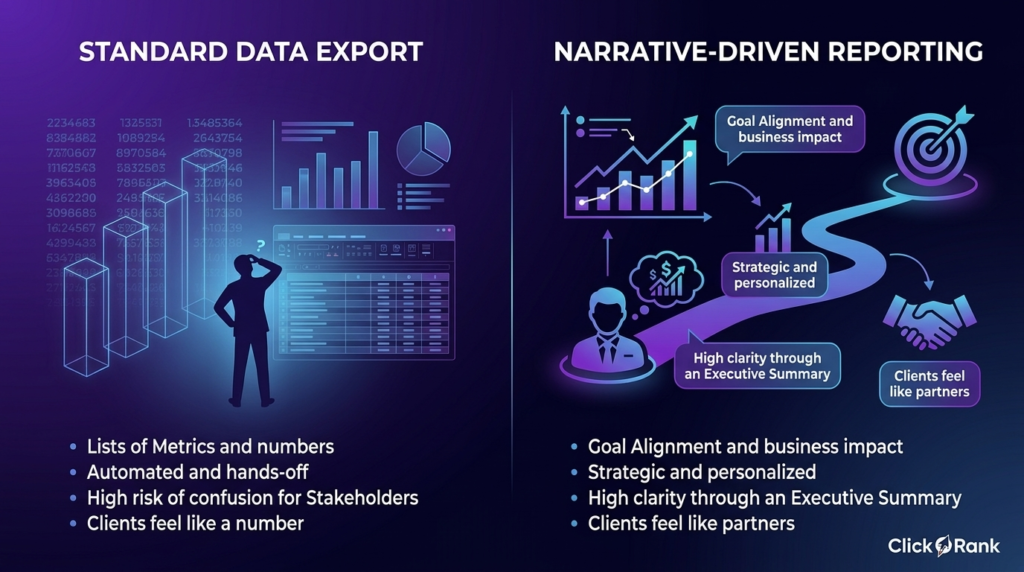
Why is Narrative-Driven SEO Reporting Better Than Standard Data Exports?
A narrative-driven seo client report tells the story of why numbers changed, while a standard export just shows the change happened. Most business owners don’t have time to interpret a raw GA4 export; they need you to explain how Search Visibility impacts their bottom line.
I remember a Local Business client who panicked because their Bounce Rate went up. In a standard report, that looks bad. But when I added a narrative, I explained that we had optimized their Google Business Profile and landing pages for quick answers. Users were finding the phone number and calling immediately rather than browsing. The “bad” metric was actually a sign of success. By providing context, you turn raw data into a roadmap for future growth.
| Feature | Standard Data Export | Narrative-Driven Reporting |
| Focus | Lists of Metrics and numbers. | Goal Alignment and business impact. |
| Effort | Automated and hands-off. | Strategic and personalized. |
| Clarity | High risk of confusion for Stakeholders. | High clarity through an Executive Summary. |
| Retention | Clients feel like a number. | Clients feel like partners. |
How does a professional report bridge the gap between technical SEO and business goals?
I’ve found that a great report acts as a translator between the server room and the boardroom. You have to take Technical SEO wins—like fixing Core Web Vitals or resolving a Crawl Error—and explain them in terms of user experience and money.
When I talk to a Marketing Manager, I don’t just say we improved “TTFB.” I say we made the site faster so fewer people leave before the page loads. This helps everyone stay on the same page. Here is how I usually bridge that gap:
- Connect technical health to stability: Explain that a clean Sitemap Status ensures the site stays indexed and protected against traffic drops.
- Link rankings to market share: Show how winning a Featured Snippet isn’t just about ego; it’s about stealing CTR from competitors.
- Translate clicks into leads: Use Conversion Rate data to show that Organic Traffic is actually filling the sales pipeline.
What role does revenue attribution play in modern SEO reports?
In 2026, you cannot hide behind “brand awareness” anymore. Revenue attribution is the only way to justify a budget to a CFO. I always make sure to track how a user first found the site via search and eventually converted weeks later. This shows the long-term value of the content we create.
For instance, I worked with an E-commerce Client where the direct sales from SEO looked low. However, when we looked at Conversion Attribution in GA4, we saw that SEO was the first touchpoint for 60% of their big spenders. Including this in the seo client report changed the conversation from “should we cut the budget?” to “how much more can we invest?”
How to explain complex ranking fluctuations to non-technical stakeholders?
Rankings bounce around, especially with AI Overviews and frequent core updates. I’ve learned that the best way to handle this is to be proactive. If a site drops, I don’t wait for the client to ask. I include a section in the report explaining the SERP Analysis.
I tell them, “We saw a dip in Position Tracking because Google is testing a new layout for these terms.” Then, I show them the plan to adapt. This builds trust because it shows you are watching the wheels turn. It turns a “loss” into an observation and an action item, which keeps the client calm.
What is the ideal frequency for sending SEO updates to clients?
Finding the right timing for reports is a balancing act. If you send too many, they get ignored; if you send too few, the client forgets why they pay you. I’ve found that a tiered approach works best to keep Client Communication healthy without over-reporting.
- Monthly: This is the standard for a deep dive into KPI Benchmarking and Year-on-Year Comparison.
- Weekly: Good for high-paced SaaS SEO or Enterprise SEO where small changes happen fast.
- Quarterly: Reserved for big-picture SEO Strategy shifts and long-term Performance Tracking.
When should you use a weekly automated pulse check?
I use weekly reports primarily as a “safety net” for my points of contact, like a Marketing Manager. These are usually White-Label dashboards from tools like Looker Studio or AgencyAnalytics. They don’t need a long narrative.
The goal here is just to show that the “lights are on.” For a Lead Generation site I managed, the weekly pulse check caught a sudden spike in Crawl Errors after a site update. Because we had that weekly visibility, we fixed it before the monthly report ever came around. It’s about being responsive, not just reactive.
Why are Quarterly Business Reviews (QBR) essential for retention?
A QBR is where you stop talking about tasks and start talking about the future. This is the time to sit down with the main Stakeholder and do a Quarterly Review of the entire partnership. I use this time to show the total Click Growth over three months and compare it to the original goals.
One of my longest-running clients stayed with me through a tough year because our QBRs focused on Budget Justification. We looked at the ROI of the past 90 days and mapped out how we would beat the competition in the next 90. It moves you from being a “vendor” to being a vital part of their business growth team.
What Information Must Be Included in a High-Converting Executive Summary?
The executive summary is the only part of the seo client report that every stakeholder will actually read. It needs to be a punchy, one-page “state of the union” that tells them if their investment is safe. I’ve found that if I don’t lead with the money, I lose their attention by the second paragraph.
I once sent a report where I buried the lead—a 20% increase in sales—on page 15. The client called me frustrated about a minor ranking drop before they even got that far. Now, I put the “bottom line” right at the top. It sets the tone for the rest of the meeting.
- The Bottom Line (ROI): Start with Organic Revenue or lead volume. Did you make them money this month?
- The “Why” Behind the Data: A two-sentence explanation of the biggest trend (e.g., “Traffic rose because our seasonal guide hit the Featured Snippet“).
- Top 3 Wins: Bulleted list of major milestones, like hitting a specific KPI Benchmarking goal.
- Current Obstacles: Honesty builds trust. Mention if a competitor is outspending you or if a technical bug slowed down Click Growth.
- Next Month’s Focus: A clear “What’s Next” so they know the SEO Strategy is evolving.
How can you visualize organic growth for the C-Suite at a glance?
Executives don’t want to squint at tiny lines on a graph; they want to see the “mountain” going up and to the right. When I present to a CEO, I use Data Visualization in Looker Studio that strips away the noise. I focus on a clean year-over-year (YoY) comparison bar chart.
Why YoY? Because month-over-month is often just seasonal noise. For a SaaS SEO client, showing that we were 40% ahead of last July was the only way to prove that our long-term Performance Tracking was actually working. I also like using a “Share of Voice” bubble chart to show how we are physically taking up more space on the SERP compared to their top three rivals.
Which metrics prove real-world ROI and business impact?
To prove impact, you have to move away from “vanity metrics.” I focus heavily on Conversion Attribution and Organic Revenue. If I’m working with a Lead Generation site, the metric that matters most is “Cost Per Lead” (CPL) from organic sources.
For example, I worked with an Enterprise SEO account where we shifted focus from high-volume “top of funnel” terms to “bottom of funnel” intent. Total traffic actually went down by 10%, which looks scary. However, our Conversion Rate doubled, and the client’s actual revenue from search grew by $50k. That is the only metric that keeps a budget from being cut during a quarterly review.
How to highlight “Big Wins” and top-performing content assets?
I like to treat “Big Wins” as a mini case study within the report. If a specific blog post starts driving 30% of the site’s leads, I call it out by name. I show the “before and after” of its Search Visibility and explain why it worked.
I usually tell the client: “This asset is our MVP this month.” For a recent E-commerce Client, we noticed a specific product comparison page was killing it. Highlighting this win allowed us to get a quick budget approval to build five more pages just like it. It turns the report from a static document into a tool for Goal Alignment and scaling.
How do you report on AI search visibility and LLM citations?
Reporting in 2026 feels a lot different than it did two years ago. We aren’t just fighting for blue links; we are fighting for “citations” in AI Overviews and LLM responses. I’ve started including a specific section for Answer Engine Optimization (AEO).
In real cases, I’ve seen sites lose 15% of their traditional clicks but gain massive brand authority because they are the “cited source” in a ChatGPT or Perplexity answer. You have to show the client that even if the click didn’t happen on Google, the brand was the one providing the answer.
| Metric | Traditional Search (Google) | AI Engine Visibility (LLM) |
| Primary Goal | Keyword Rankings (1-10) | Citation/Source Inclusion |
| Success Indicator | High CTR to Website | Sentiment & Brand Mention |
| User Intent | Browsing/Research | Direct Answer Retrieval |
| Main Tool | Google Search Console | Brand Tracking/Referral Data |
What is the “Answer Inclusion Rate” and why does it matter in 2026?
The Answer Inclusion Rate is a metric I use to track how often our content is used to generate an AI response for our target keywords. It matters because “zero-click searches” are the new reality. If your site provides the data for an AI Overview, you are the “authority,” even if the user doesn’t click through immediately.
I track this by performing regular SERP Analysis on our top 50 keywords. If we are the cited source in 40 of them, our inclusion rate is 80%. I explain to clients that this is “digital real estate”—we are owning the conversation at the top of the page, which builds massive trust before the user even visits the site.
How to track traffic coming from ChatGPT and Perplexity?
Tracking this isn’t as straightforward as old-school search, but it’s doable. I look at the Referral Source data in GA4. You’ll see traffic coming from domains like chatgpt.com or perplexity.ai.
Here’s the thing: that traffic is usually “high intent.” When I showed a SaaS client that users coming from Perplexity had a 4x higher Engagement Time than standard Google users, they finally understood why I was obsessed with structured data and clear, factual content. I use API Connectors to pull this referral data into a custom dashboard so the client can see the “AI Traffic” growing month over month.
How Does ClickRank Automate On-Page SEO Reporting and AI Audit Readiness?
ClickRank moves beyond the old “audit and advise” model by actually performing the fixes it finds. While standard tools give you a massive to-do list of missing meta tags or broken links, ClickRank uses an AI SEO Agent to bulk-solve these issues in one click. For a professional seo client report, this means you can show real-time progress instead of just listing problems you haven’t fixed yet.
I’ve found this to be a lifesaver for Enterprise SEO projects where manual updates to 5,000 product descriptions are impossible. By connecting directly to Google Search Console, the tool identifies which pages are underperforming and automatically updates Title Tags and Meta Descriptions to boost CTR. It turns your monthly report from a “wish list” into a “done list.”
| Feature | Manual Audits (Standard Tools) | ClickRank Automation |
| Fix Implementation | Manual CMS entry (hours/days). | One-Click Fixes (seconds). |
| Data Source | Third-party estimates. | Real-time Google Search Console data. |
| AI Readiness | Manual checklist of Schema. | Automated AI Model Index Checker. |
| Scaling | Limited by team size. | Unlimited Optimizations across any scale. |
How can you check what percentage of your website is ready for LLM search engines?
You can’t just guess if your site is ready for the “AI era.” I use ClickRank’s AI Model Index Checker to get a concrete score on how well LLMs like ChatGPT and Gemini can “digest” my content. It scans for technical blockers—like poor Crawl Error management—and content structure issues that make it hard for AI to cite you.
When I ran this on a SaaS SEO site last month, we discovered that 40% of our pages were too complex for AI crawlers to parse. Here is the checklist I follow using the tool:
- Verify AI Crawler Access: Ensure your robots.txt isn’t accidentally blocking GPTBot or Google-Extended.
- Analyze Content Structure: Use the tool to check for a clean H1-H2-H3 hierarchy and short, factual paragraphs.
- Scan for “llms.txt”: Check if you have the new industry-standard file that gives explicit instructions to AI models.
- Check Semantic Clarity: Look for high AI Readiness Scores (aiming for 80+) which signal that your content is “extractable.”
Using ClickRank to score content for AI-powered “Direct Answer” potential
The “Direct Answer” potential is the holy grail of 2026 SEO. ClickRank analyzes your text to see if your first sentence actually answers the user’s Search Intent. If you bury the lead, AI engines like Perplexity will ignore you.
I recently used this to audit an FAQ section for a Local Business. The tool flagged several answers as being “too conversational” and not “factual” enough. By tightening the structure—moving the answer to the very first line—our Answer Inclusion Rate jumped by 20% in two weeks. It’s all about making it as easy as possible for the AI to “copy-paste” your brand into its response.
Why is automated on-page SEO essential for scaling client reports?
If you are an SEO Agency or a Freelancer, your time is better spent on SEO Strategy than on manual Image Alt Text updates. Automation allows you to scale your impact without scaling your stress.
In real cases, I’ve seen agencies use ClickRank to handle the “drudge work” for 50 clients simultaneously. When it comes time for the Monthly Report, the software has already logged every change. You aren’t reporting on efforts; you are reporting on completed optimizations. This keeps your Client Retention high because the client sees constant, active improvement on their site without you having to bill them for 100 hours of data entry.
How to integrate ClickRank’s AI readiness scores into your monthly client deck?
Adding AI metrics to your deck proves you are future-proofing the client’s business. I like to use a dedicated “AI Visibility” slide that sits right next to traditional Keyword Rankings. It shifts the conversation toward Answer Engine Optimization (AEO) and helps justify the budget for high-quality content.
- Include the “AI Readiness Score”: Show a simple 1–100 dial from ClickRank that summarizes technical and content health for LLMs.
- Visualize Indexing Progress: Use a chart showing the number of pages successfully indexed by AI crawlers vs. those with blockers.
- Highlight Citation Wins: Show screenshots of your brand being cited in Google AI Overviews or ChatGPT Search.
- Benchmark Against Competitors: Use ClickRank’s Competitive Intelligence to show if you are more “AI-ready” than your top rival.
Tracking the progress of automated on-page optimizations over time
I always include a “Change Log” visualization in my seo client report. ClickRank tracks every Title Tag and Schema Markup update it makes. I show this as a timeline graph against organic traffic growth.
For a Lead Generation client, we saw a direct correlation: as the “Optimization Completeness” reached 90%, the Search Visibility for our main head terms started to climb. Showing this link between automated activity and real-world results makes the client feel like they are getting a “high-tech” service that stays ahead of the curve.
How to prove to clients that their site is optimized for ChatGPT Search and Google Gemini
Clients often ask, “Are we showing up in the AI thing?” Instead of saying “I think so,” I show them the technical proof. I pull the Referral Source data from GA4 to show traffic specifically from chatgpt.com.
Then, I use ClickRank to show the Schema layers we’ve added specifically for LLMs. I explain it like this: “We added this data layer so that when someone asks Gemini for a recommendation, your business has all the ‘facts’ ready for it to grab.” This makes the abstract concept of AI search visibility feel like a tangible asset they now own.
Which Core SEO KPIs Actually Matter for Your Client’s Bottom Line?
I’ve spent years looking at every metric under the sun, and here is the truth: most clients only care about 2 or 3 numbers. If you show a Local Business owner a graph of “Pages per Session,” they might nod politely, but they’re actually wondering if the phone is ringing. You have to tailor your seo client report to the specific goals of the business.
In real cases, I’ve found that focusing on “Lead Quality” over “Traffic Volume” is what saves accounts. I once worked with a SaaS SEO client who had millions of visitors but zero growth in sign-ups. We shifted our KPI Benchmarking to focus on “Product-Led Content” conversions, and even though total traffic dropped, their ROI doubled.
| Business Type | Priority KPI 1 | Priority KPI 2 | Priority KPI 3 |
| E-commerce | Organic Revenue | Average Order Value | Conversion Attribution |
| Lead Generation | Conversion Rate | Cost Per Lead (CPL) | Goal Alignment |
| SaaS | Monthly Recurring Revenue | Engagement Time | Trial Sign-ups |
| Local Business | Phone Calls / Directions | Google Business Profile Views | Local Pack Rankings |
How should you track organic visibility and ranking distribution?
I like to think of Search Visibility as your “market share” on Google. Instead of just tracking five “hero” keywords, you should look at how many keywords you have in positions 1–3, 4–10, and 11–20. This “distribution” tells you if your site is actually gaining authority or just getting lucky with one or two pages.
When I report this to a Marketing Manager, I use a simple bar chart to show the “upward shift.” It’s much more satisfying to see 100 keywords move from page 2 to page 1 than to see a single keyword wiggle by one spot.
- Total Keywords in Top 10: This shows the overall health and “reach” of your SEO Strategy.
- Share of Voice (SoV): Compare your visibility against your top three rivals for your most profitable terms.
- Ranking Volatility: Mention if AI Overviews are causing fluctuations in your specific niche.
- Pixel Depth: Track how far down the page your “Position 1” actually is (since ads and AI now take up the top half).
What is the best way to report on Featured Snippets and AI Overviews?
Reporting on “Position 1” isn’t enough anymore because a Featured Snippet or an AI response can push traditional links way down. I treat these as “Zero-Click Wins.” I show the client a screenshot of their content being used as the “source” for an AI Overview.
I explain it as “owning the answer.” Even if the CTR is lower than a traditional link, the brand authority gained is massive. I make sure to tag these specifically in the report so the client sees that we aren’t just ranking—we are the “authority” Google trusts to answer the user directly.
How to differentiate between branded and non-branded keyword success?
This is a huge point of confusion. Branded Traffic (people searching for the client’s name) usually converts high, but it’s often driven by offline ads or word-of-mouth, not SEO. To prove your worth, you must highlight Non-Branded Keywords.
I always separate these in my Position Tracking reports. I tell the client: “Your brand name is doing great, but look at this 20% growth in people who didn’t know you but found you through our new guides.” That is where real SEO growth happens, and it’s the best way to demonstrate Search Visibility to a skeptical stakeholder.
How do you measure user engagement and conversion quality in GA4?
Total sessions are a “vanity metric.” I’ve seen sites with 100k visitors where everyone leaves in five seconds. To show real value, you have to look at how people interact with the content. I focus on Engagement Time and “Scroll Depth” to see if our content is actually being read.
In a professional seo client report, I use these metrics to justify content updates. If a high-traffic page has a 10-second engagement time, I tell the client: “People are finding us, but they aren’t finding what they need. We need to rewrite the intro.”
- Key Event Rate: The percentage of visitors who took a high-value action (like filling out a form).
- Average Engagement Time: Shows if the traffic we are bringing in is actually the “right” audience.
- Engagement Rate: A better version of the old “Bounce Rate” that tells us if the user did anything useful.
- Referral Source Quality: Identifying if search visitors stay longer than social media visitors.
Why is tracking “Key Events” more important than total sessions?
A “Key Event” (what we used to call a conversion) is the only thing that pays the bills. You can have a million sessions, but if none of them result in a “Key Event,” the SEO is failing.
For a SaaS SEO project I handled, we stopped chasing high-volume “what is” keywords and focused on “how to” keywords. Traffic stayed flat, but “Key Events” (free trial starts) went up by 30%. I made sure that was the biggest chart in the report. It proved that our ROI Demonstration was based on business growth, not just “lines on a graph.”
How to analyze click-through rate (CTR) decay on high-volume pages?
CTR decay happens when your page stays at the top of the rankings but starts getting fewer clicks. This is usually because a competitor wrote a better title or Google added an AI Overview at the top.
I use Google Search Console data to track this. If I see a page’s CTR drop from 5% to 2% while the position stays the same, I know it’s time to test a new Title Tag or add Schema Markup. I explain this to the client as “protecting our territory.” It’s a proactive way to show that you are constantly fine-tuning the site to maintain its Search Visibility.
How to Report on Technical SEO Health and Site Performance?
Reporting on Technical SEO can be a trap. If you get too deep into server logs or minification, the client’s eyes will glaze over. I’ve found that the best approach is to present technical health as the “foundation” of the house. If the foundation is cracked, it doesn’t matter how pretty the “content” paint is—the whole thing will eventually sink.
In real cases, I use a “Stoplight System” (Red, Yellow, Green) to show status. When I worked with an Enterprise SEO client, they had over 10,000 pages with Crawl Errors. Instead of listing every URL, I showed them a single chart: “Percentage of Site Indexed.” Seeing that only 60% of their products were even visible to Google was the wake-up call they needed to approve a technical overhaul.
| Technical Area | What We Check | Why It Matters for ROI |
| Indexation | Sitemap Status & Coverage | If Google can’t find it, customers can’t buy it. |
| Site Speed | Core Web Vitals | Slow sites kill Conversion Rates. |
| Mobile Health | Responsive Design & Layout | Most Organic Traffic happens on phones. |
| Security | SSL & HTTPS Status | Trust is a major ranking factor in 2026. |
Why are Core Web Vitals critical for SEO reporting in 2026?
By 2026, Core Web Vitals aren’t just a “tie-breaker”—they are a baseline requirement. Google’s algorithms are now incredibly sensitive to how “stable” a page feels. I always include these in a seo client report because they bridge the gap between SEO and User Experience (UX).
I remember a SaaS SEO client who had great content but a 70% Bounce Rate. We looked at their “Interaction to Next Paint” (INP) and realized the “Sign Up” button was lagging by nearly a second. Fixing that technical lag didn’t just help rankings; it directly increased their trial sign-ups.
- User Retention: Faster pages keep people on the site longer, improving Engagement Time.
- Ranking Stability: High-performing sites are less likely to be “shaken” by minor algorithm updates.
- Ad Cost Reduction: If you also run PPC, better landing page speed can actually lower your cost-per-click.
- AI Engine Preference: LLMs and AI crawlers prefer clean, fast-loading code to scrape information accurately.
How to explain LCP, INP, and CLS scores to a client?
I avoid the technical definitions and use “Human Experience” translations. Here is how I explain them during a Monthly Report:
- LCP (Largest Contentful Paint): I call this “The Loading Speed.” It’s how long it takes for the main part of the page to show up so the user can actually start reading.
- INP (Interaction to Next Paint): I call this “The Responsiveness.” When a user clicks a button or a menu, how fast does the site react? This replaced the old FID metric because it measures the entire visit.
- CLS (Cumulative Layout Shift): I call this “The Visual Stability.” You know when you’re about to click a link and the page jumps, making you click an ad instead? That’s a bad CLS score.
What is the impact of mobile usability on organic rankings?
In 2026, Google uses “Mobile-First Indexing” exclusively. If your site looks “okay” on a desktop but “broken” on an iPhone, your desktop rankings will suffer too. I’ve seen Local Business clients lose half their Search Visibility because their “Call Now” button was too small for a thumb to hit.
In my reports, I include a “Mobile vs. Desktop” traffic split. If the mobile Conversion Rate is significantly lower than desktop, I highlight it as a major “Big Win” opportunity. It’s often an easy fix that yields a huge jump in Organic Revenue.
How to visualize crawlability and indexation status for clients?
I use the “Indexation Funnel” visualization. It shows how many pages were “Discovered,” how many were “Crawled,” and how many were actually “Indexed.” This helps a Marketing Manager understand that SEO isn’t just about writing; it’s about accessibility.
Using Google Search Console data, I show a line graph of “Valid Pages” vs. “Excluded Pages.” If the “Excluded” line starts climbing, it usually means we have a Sitemap Status issue or a “thin content” problem. Visualizing it this way makes a complex server issue look like a simple supply-chain problem that needs fixing.
Which Search Console errors should be prioritized in a monthly report?
Don’t report every “404 Not Found” error—that’s fluff. I prioritize the errors that actually stop the money from coming in:
- Server Errors (5xx): These mean the site is literally down for Google. This is a “Red Alert.”
- Redirect Loops: These trap crawlers and users in a circle, killing your Crawl Budget.
- Robots.txt Blocks: I once found a client had accidentally blocked their entire “Products” folder. That’s the first thing I put in the Executive Summary.
- Noindex Tags: Crucial to check after a site launch to ensure the “developer settings” were turned off.
How to monitor the impact of site speed on conversion rates?
I love showing a “Speed vs. Revenue” correlation chart. Most E-commerce Clients understand that for every second shaved off load time, revenue usually ticks up. I pull data from GA4 and compare page load times against Key Event completions.
For example, I showed a client that users who experienced a 2-second load time converted at 4%, while those with a 5-second load time converted at 1%. That $30,000 “gap” in potential revenue made the technical bill much easier for them to swallow. It turns a technical “chore” into a clear ROI Demonstration.
How Do You Demonstrate Authority Through Backlink and Competitor Analysis?
Showing off a list of links isn’t enough anymore. You have to prove that those links actually moved the needle for the client’s Domain Authority. In 2026, Google is much better at ignoring “junk” links, so your seo client report should focus on the quality and relevance of the sites talking about your client.
I’ve found that clients get a real “aha!” moment when they see a big name in their industry linking to them. It’s not just an SEO win; it’s a PR win. When I show a SaaS SEO founder that a major tech publication cited their research, they stop asking about “how many links we got” and start asking “how do we get more of those?”
- Link Relevance: Does the referring site actually relate to the client’s niche?
- Traffic-Driving Links: Identify links that actually send referral visitors, not just bots.
- Authority Growth: Track the steady climb of the site’s “trust score” over six months.
- Competitor Comparison: Show which high-value links the competition has that we are currently missing.
What backlink metrics prove that your link-building strategy is working?
I avoid the total “link count” because it’s easily manipulated. Instead, I focus on the growth of Referring Domains. If you have 1,000 links but they all come from one low-quality site, your authority is stagnant. You want to see a wide variety of unique, reputable sources.
In a professional report, I also track “Anchor Text Diversity.” If 90% of your links use the exact same keyword, you look like a spammer to Google’s latest updates. I show the client a “natural” profile where people link to them using their brand name or helpful phrases. It proves we are building a long-term brand, not just a temporary ranking boost.
How to identify and report on high-value referring domains?
I like to call these “Powerhouse Links.” In my Monthly Report, I create a small “Hall of Fame” section. I highlight the top 3-5 domains that started linking to us that month. I include the site’s name and why that specific link matters for their Search Visibility.
For an E-commerce Client, I once secured a link from a major national gift guide. By highlighting that one domain, I showed them how our outreach strategy put their products in front of five million potential customers. That one “Powerhouse Link” was worth more than a hundred random directory listings, and the report made sure the client knew it.
How to explain the risk of toxic links and the need for a disavow strategy?
Toxic links are like digital graffiti—they make the site look untrustworthy. I explain this to Stakeholders by saying, “We don’t want to be seen hanging out in a bad neighborhood.” If a competitor attacks us with “Negative SEO” or we inherit a messy link history, I show them the plan to clean it up.
I use a simple “Risk Meter” in the report. If the meter is in the red, I explain that we are using a disavow strategy to tell Google to ignore those specific “bad” links. It’s a great way to show you are “guarding the gates” of their website’s reputation and protecting their long-term ROI.
How to benchmark client performance against industry competitors?
Clients are naturally competitive. They want to know why “the other guy” is winning. I use a Competitor Comparison Framework to show exactly where we stand. It’s not about copying them; it’s about finding their weaknesses and our opportunities.
I remember a Local Business client who was frustrated they weren’t #1. When I showed them the framework, they saw that the competitor had 50 more local citations and a faster mobile site. It turned their frustration into a clear checklist of “what we need to do to win.”
| Metric | Your Website | Main Competitor A | Main Competitor B |
| Search Visibility | 25% | 40% | 15% |
| Domain Authority | 45 | 52 | 38 |
| Top 10 Keywords | 120 | 210 | 95 |
| Core Web Vitals | Passing | Failing | Passing |
What is “Share of Voice” and how do you track it?
Share of Voice (SoV) is essentially your “slice of the pie.” It measures how often your brand appears in search results compared to everyone else for a specific set of keywords. I track this in Semrush or Ahrefs and present it as a pie chart.
I tell clients: “Think of the SERP as a shelf in a grocery store. This chart shows how much of that shelf space we own.” If our SoV goes from 10% to 15%, it means we are physically pushing competitors out of the user’s view. It’s one of the best ways to visualize growth for an Enterprise SEO client who cares about market dominance.
How to find content gaps where competitors are outranking your client?
A “Content Gap” is basically a list of money-making keywords that your competitors rank for, but you don’t. In my reports, I present this as a “Growth Roadmap.” I don’t just say “we are missing these words”; I say “here is the revenue we are leaving on the table.”
For a SaaS client, I found a competitor was getting 5,000 hits a month from a “comparison guide” we didn’t have. By including this gap in the seo client report, I secured the budget to write three new comparison pages. We eventually closed that gap and “stole” about 20% of that traffic back. It’s an easy way to prove you are always looking for the next win.
How to Use Automation to Save Hours on SEO Reporting?
I used to spend the first three days of every month manually copying numbers into PowerPoints. It was soul-crushing and, frankly, a waste of the client’s money. By the time I finished the “data entry,” I was too tired to actually analyze what the numbers meant. Moving to an automated workflow changed everything—it shifted my job from “data fetcher” to “strategist.”
The goal of automation isn’t just to work less; it’s to provide Data Accuracy and real-time insights. In 2026, tools like Whatagraph or AgencyAnalytics can pull live data directly from Google Search Console and GA4. This means when a client asks a question on the 15th of the month, I don’t have to “get back to them”—I just look at the live dashboard.
| Tool | Best For | Integration Level | Key Feature |
| Looker Studio | Customization | High (Google ecosystem) | Completely free & flexible. |
| AgencyAnalytics | SEO Agency scale | Very High | White-Label & automated scheduling. |
| Whatagraph | Data Visualization | High | Clean, “c-suite ready” visual style. |
| SE Ranking | All-in-one SEO | Medium | Combines audits + reports in one. |
What are the best ways to build a Looker Studio dashboard for SEO?
Looker Studio is my go-to because it’s free and connects to almost everything via API Connectors. However, the “blank canvas” is intimidating. I’ve learned that the best dashboards follow a “Top-Down” approach: start with the big business wins and end with the technical details.
I remember building a dashboard for a Marketing Manager that was too complex. They never looked at it. Once I simplified it to just four big “scorecards” at the top (Revenue, Leads, Traffic, and CTR), they started checking it every morning.
- Use Calculated Fields: Create a “Non-Branded Traffic” filter so the client sees real SEO growth without the brand noise.
- Time-Period Comparisons: Always include a “Comparison to Previous Year” toggle to account for seasonality.
- Keep it Interactive: Add filters for “Device Category” or “Landing Page” so the client can explore the data themselves.
- Add “Text Boxes” for Context: Automation is great, but I always leave a space to type in a quick “human” note about what happened that month.
How to integrate Google Search Console and GA4 data into one view?
This is where the magic happens. In Looker Studio, you can use “Data Blending” to put your Search Visibility (from GSC) right next to your Conversion Rate (from GA4). This allows you to show a direct line from a specific keyword ranking to an actual sale.
I once showed an E-commerce Client a blended table where they could see that while “red sneakers” had the most impressions in Search Console, “waterproof trail runners” actually had the highest Organic Revenue in GA4. That single view allowed us to stop wasting time on the wrong keywords and double down on what was actually selling.
How to set up white-label reporting for an agency-branded feel?
If you want to charge premium prices, your reports can’t look like generic exports. White-Label reporting allows you to put your agency’s logo, colors, and even a custom domain (like reports.youragency.com) on the dashboard.
Most tools like Whatagraph or AgencyAnalytics make this easy. When I moved my reports to a custom branded portal, my Client Retention improved because the service felt more “enterprise-grade.” It tells the client that you’ve invested in professional infrastructure to track their ROI.
Which SEO reporting software offers the best value in 2026?
Value doesn’t always mean “cheapest.” In 2026, the best value comes from tools that save you the most time while offering AI Readiness features. For a Freelancer, Looker Studio is the best value because it’s free. But for an agency, a paid tool that automates Position Tracking and Site Audits into one report is worth every penny.
I currently find that SE Ranking offers a great middle ground. It’s affordable but includes a very “human-friendly” reporting builder. If you are doing Enterprise SEO, you might need the heavy lifting of something like AgencyAnalytics, which handles API integrations for dozens of different platforms beyond just SEO.
Should you use automated templates or custom-built reports?
Here is my rule of thumb: Use a template for the structure, but customize the insights. Total automation is a trap. If you just send an “Auto-Generated” PDF every month, the client will eventually wonder why they are paying your retainer when a piece of software is doing the work.
I use a standard Reporting Template to save 90% of the time on formatting. Then, I spend the remaining 10% of my time writing a custom Executive Summary. I talk about the “Big Wins,” the Performance Tracking against their specific goals, and what we are changing for next month. This “hybrid” approach gives the client the speed of automation with the strategic brain of a human expert.
How to Turn an SEO Report Into a Strategic Roadmap for Next Month?
A common mistake I see is treating an seo client report like a history book. If your report only looks backward, the client starts to feel like they’re paying for a monthly autopsy of their website. To keep them excited, the last section of your report must look forward. It should serve as a bridge that turns last month’s data into next month’s to-do list.
I once worked with a client who was ready to quit because “nothing was happening.” In my next report, I stopped listing what we did and started showing a “Future Impact” roadmap. I showed them exactly which keywords we were 20% away from winning. They didn’t just stay; they increased the budget.
- Priority Ranking: Label tasks as “High, Medium, or Low” impact so the client knows where their money is going first.
- The “Why” Factor: For every task, link it to a specific goal (e.g., “Fixing internal links to improve Search Visibility for our main service page”).
- Resource Allocation: Briefly mention who is responsible for what, which helps with Goal Alignment.
- Milestone Tracking: Show how next month’s tasks get us closer to the Quarterly Review targets.
How to present actionable recommendations that clients will actually approve?
The secret to getting an “okay” on your recommendations is to stop talking about “SEO tasks” and start talking about “business opportunities.” If I ask a client to “optimize 50 meta descriptions,” they see a bill. If I say, “We’re going to improve the CTR on these 50 pages to capture an estimated $5,000 in missed revenue,” they see an investment.
I’ve found that using a “Problem-Solution-Impact” framework works every time. I tell them: “Here is the issue, here is how we fix it, and here is what happens to your ROI when we’re done.” It takes the guesswork out of the decision for them.
How to use “Content Decay” analysis to plan your next content sprint?
Content Decay is a silent killer. It’s when an old post that used to drive tons of traffic starts losing its rankings because the information is outdated or a competitor stepped up. I use Google Search Console to find pages where traffic is down 15% or more year-over-year.
In real cases, I present this as a “Content Refresh” sprint. I explain to the client that it’s much cheaper and faster to “save” an existing page than to build a new one from scratch. When they see the Click Growth return after a simple update, they realize that maintaining their current “real estate” is just as important as buying new land.
What is the best way to set realistic SEO expectations and forecasts?
Over-promising is the fastest way to lose a client. I’ve learned to be extremely careful with forecasting. I never promise “Rank #1 in 30 days.” Instead, I use KPI Benchmarking to show a “Conservative, Likely, and Aggressive” growth path.
I tell my clients, “SEO is a momentum game.” I show them the current trend line and explain that while we can’t control Google’s AI Overviews, we can control our “Output Quality” and “Technical Health.” This sets the stage for a long-term partnership built on honesty rather than hype.
How to project Year-on-Year (YoY) growth using historical data?
To project growth, I look at the last 24 months of Organic Traffic to account for seasonality. If the site naturally dips in December, I don’t panic; I show the client that even with the dip, we are still 10% higher than last December.
I use a simple linear regression in a spreadsheet to show where we should be in six months if we maintain our current pace. It makes the SEO Strategy feel grounded in math. For a Lead Generation client, showing this projection helped them plan their hiring for the sales team because they could see the “wave” of new leads coming three months in advance.
Branded traffic comes from people who already know your name while non-branded traffic shows how many new customers found you through search. Separating them proves that your SEO strategy is actually growing your reach rather than just riding on existing brand awareness.
AI Overviews often provide the answer directly on the search results page which can lower your traditional click-through rate. However appearing as a cited source in these overviews builds massive authority and often brings in higher-quality visitors who are ready to buy.
A session is just a visit to your site but a key event is a specific action like a form fill or a purchase. Focusing on key events tells you if your traffic is actually making you money instead of just inflating your visitor count.
You should review minor shifts monthly but wait for a quarterly business review to make major strategy changes. This gives search engines enough time to process your updates and provides enough data to spot real trends versus temporary ranking bounces.
Yes you can see this in your referral traffic reports within GA4 by looking for sources like chatgpt.com. Tracking these users helps you understand how much money you are making from the new wave of AI-powered search engines. Why should I separate branded and non-branded traffic in my report?
How do AI Overviews affect my monthly organic click data?
What is the difference between a session and a key event in GA4?
How often should I update my SEO strategy based on report data?
Can I track revenue from users who find me through ChatGPT or Perplexity?