Server-side rendering SEO means building full HTML on the server before sending it to browsers and crawlers, so the content exists immediately instead of waiting on client-side JavaScript. This helps Googlebot index text faster and more reliably, without a rendering delay, and it matters more now because most AI crawlers, including GPTBot, ClaudeBot, and PerplexityBot, don’t execute JavaScript at all.
What is server-side rendering?
Server-side rendering (SSR) is a method where the server builds the complete HTML for a page on each request, rather than sending a near-empty HTML shell and letting the browser’s JavaScript fill it in.
If you ask what is server-side rendering in one line, the answer is simple: the server does the work before the browser sees the page. That is the core of server-side rendering SEO.
In a single-page application (SPA) using pure client-side rendering (CSR), the browser downloads a small HTML file, then runs JavaScript, builds a virtual DOM, and paints the content. With SSR, that work happens on the server first.
The basic flow for a server-side rendered page looks like this:
- A browser or crawler requests a URL.
- The server runs the application code, fetches any needed data, and generates full HTML.
- The server sends that complete HTML to the client.
- The browser displays the HTML immediately, then JavaScript “hydrates” it to attach interactivity.
- Googlebot can read the text, links, and metadata directly in the raw HTML, without waiting for a second rendering step.
This matters for search because it changes what’s actually present in the raw HTML versus the rendered HTML a crawler sees on first contact. With SSR, the raw HTML already contains the content.
With CSR, the raw HTML is often close to empty until JavaScript runs.
Tools that support SSR include React (via Next.js), Vue.js (via Nuxt), Angular (via Angular Universal), Svelte (via SvelteKit), and Remix. Each one handles the server rendering step a little differently, but the underlying goal is the same: ship usable HTML on the first response.
How SSR, CSR, SSG, and ISR differ
Server-side rendering SEO discussions often get muddled because people treat SSR, CSR, SSG, and ISR as one topic. They’re related but distinct, and the SSR vs CSR comparison is only part of the picture.
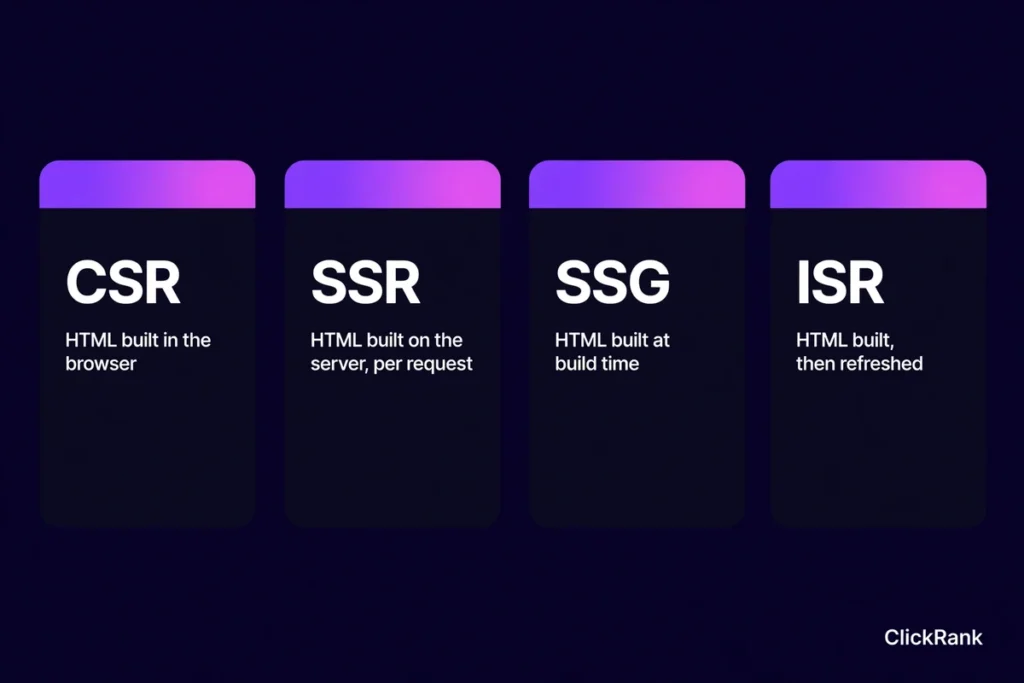
- CSR (client-side rendering): the server sends minimal HTML; the browser runs JavaScript to build the page. Fast to develop, slow for first content, and dependent on the crawler executing JavaScript.
- SSR (server-side rendering): the server renders full HTML on every request. Content is present immediately, but each request costs server compute.
- SSG (static site generation): HTML is pre-rendered at build time, before any request happens. Pages are served as static files, often from a CDN, making them very fast.
- ISR (incremental static regeneration): a hybrid that serves static HTML but regenerates it in the background on a schedule or on demand, without a full rebuild.
| Approach | When HTML is built | Typical speed | SEO strength | Best fit |
| CSR | In the browser, on load | Slower first paint | Weakest without extra work | Logged-in dashboards, internal tools |
| SSR | On the server, per request | Fast first byte, server-dependent | Strong | Pages with frequently changing, personalized, or user-specific content |
| SSG | At build time, ahead of requests | Fastest | Strong | Blogs, marketing pages, docs |
| ISR | At build time, then refreshed | Fast, with periodic updates | Strong | Large catalogs, content that updates but doesn’t need instant builds |
The SSR vs CSR distinction is the one most SEOs reach for first, but in practice the real decision for most sites is SSR vs SSG vs ISR, since pure CSR with no server rendering is rarely the safest choice for public, indexable pages.
Why server-side rendering SEO helps rankings
Server-side rendering SEO benefits come down to how Googlebot actually processes pages, not just whether Google “can” run JavaScript.
Google has confirmed that Googlebot processes JavaScript in three phases: crawling, rendering, and indexing. According to Google Search Central’s JavaScript SEO documentation, Googlebot first crawls raw HTML and queues URLs, then runs JavaScript rendering in a second pass once rendering resources are available.
That second pass is not instant. Pages needing client-side rendering sit in a render queue before Google processes the JavaScript and can extract the full content.
For a small site, that delay might be minor. For a large site with a limited crawl budget, new or updated pages that depend on client-side rendering can take noticeably longer to get indexed, since Googlebot has to allocate separate resources for the rendering step.
With SSR, the main content has no render queue to wait on. The text, links, and headings are already in the HTML Googlebot fetches on the first pass.
This also touches Core Web Vitals, specifically time to first byte (TTFB), largest contentful paint (LCP), cumulative layout shift (CLS), and interaction to next paint (INP). Google’s documented Core Web Vitals thresholds, per web.dev’s Core Web Vitals article, set “good” LCP at 2.5 seconds or less, “good” CLS at 0.1 or less, and “good” INP at 200 milliseconds or less.
SSR can help LCP because meaningful content paints sooner, without waiting for a client-side JavaScript bundle to execute first. It’s worth tracking these metrics directly, since Core Web Vitals scores vary by implementation, not by rendering method alone.
Mobile matters here too. Since Google uses mobile-first indexing, the mobile version of a server-side rendered page needs to deliver the same content and metadata as the desktop version, not a stripped-down equivalent.
None of this means CSR pages can’t rank. It means server-side rendering SEO advantages mostly come from removing a step and a dependency between “the page exists” and “Google has the content.”
Server-side rendering SEO and AI crawlers
A newer reason server-side rendering SEO has become more urgent has little to do with Google at all.
AI crawlers like GPTBot (OpenAI), ClaudeBot (Anthropic), and PerplexityBot behave differently from Googlebot. According to a comparison published by Customer Impact (Tanguy De Keyzer, updated 17 October 2026) citing Vercel’s documentation, the major AI crawlers do not render JavaScript.
They fetch raw HTML and stop there; there’s no second rendering pass like Googlebot’s.
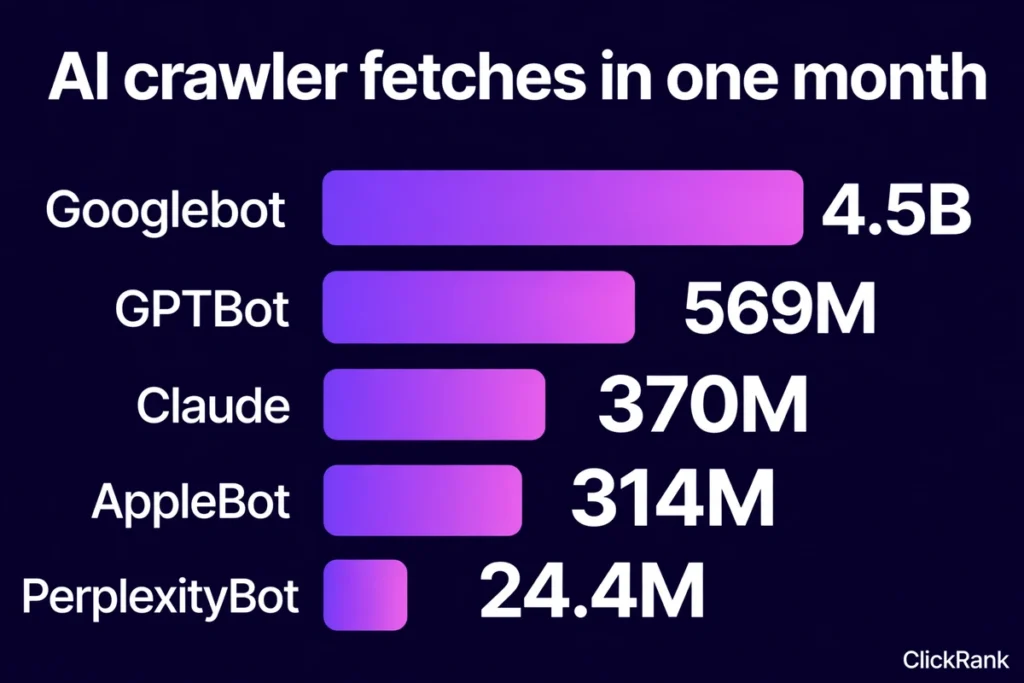
Vercel and MERJ measured this directly: in one month, Googlebot made 4.5 billion fetches, GPTBot 569 million, Claude 370 million, AppleBot 314 million, and PerplexityBot 24.4 million. AI crawlers combined made nearly 1.3 billion fetches, a little over 28 percent of Googlebot’s volume.
That means a page relying on client-side rendering to display its core text may show up as an empty shell to GPTBot or ClaudeBot, even if Googlebot eventually renders it correctly.
The practical effect: a CSR-only page might still rank in Google search after the render queue catches up, but it can be functionally invisible to AI crawlers compiling answers for ChatGPT, Claude, or Perplexity.
Social and preview crawlers follow the same pattern. OpenGraph tags used by Facebook, LinkedIn, and Slack previews, along with most social crawlers, don’t execute JavaScript either.
If OpenGraph metadata is injected client-side, link previews can break even when the live page looks fine in a browser. Server-side rendering SEO fixes that too, because the OpenGraph tags sit in the HTML from the start.
This is one reason server-side rendering SEO work increasingly overlaps with AI search and AI citations: content that never executes JavaScript for a bot simply doesn’t exist for that bot. For sites trying to build AI visibility, SSR or SSG removes that failure point entirely.
The trade-offs: when SSR hurts
SSR is not a free upgrade. It introduces real costs that a full server-side rendering SEO plan has to account for.
- Server cost and load: every request triggers server-side computation, which scales cost with traffic in a way static files don’t.
- TTFB risk: if the server has to fetch data, run logic, and render HTML on each request, TTFB can get worse, not better, especially under load or with slow databases.
- Caching complexity: SSR pages need deliberate caching (CDN, edge caching, or application-level caching) to avoid regenerating identical HTML on every request.
- Hydration mismatch: if the server-rendered HTML doesn’t exactly match what the client-side JavaScript expects to render, users can see flashes of incorrect content or console errors during hydration.
- Development complexity: SSR often requires more careful handling of browser-only APIs, environment differences, and data-fetching timing than a pure CSR build.
A common misconception is that SSR automatically reduces TTFB. It doesn’t.
SSR adds a rendering step on the server for every request; without caching or a CDN in front of it, TTFB can actually be slower than a cached static file would deliver.
Pre-rendering approaches like SSG, paired with a CDN, are what reliably improve TTFB, not SSR by itself.
Web.dev says most sites should aim for a TTFB of 0.8 seconds or less.
Server-side rendering SEO in Next.js, Angular, Nuxt, and SvelteKit
Server-side rendering SEO implementation details vary by tool, though the underlying request-to-HTML principle stays the same.
Next.js is the most common path for React. The App Router introduced React Server Components, rendering components on the server by default and letting developers opt specific components into client-side interactivity with “use client.”
According to Next.js’s own rendering documentation, Server Components are rendered on the server, and their output is streamed to the client, which supports progressive rendering through React Suspense boundaries.
Most server-side rendering Next.js work starts with the App Router rather than the older Pages Router. Server-side rendering Next.js projects can also use the older Pages Router’s getServerSideProps function for per-request SSR, or static generation functions for SSG.
Angular Universal brings SSR to Angular applications, rendering the app on the server and bootstrapping it on the client, aimed at the same crawl and performance problems as React SSR.
Nuxt is the SSR option for Vue.js, handling server rendering, routing, and data fetching in a structure similar to Next.js, with its own hybrid rendering modes for mixing SSR, SSG, and CSR per route.
SvelteKit compiles Svelte components with SSR enabled by default, and like Next.js, supports per-route rendering strategies.
Remix focuses heavily on server rendering and nested data loading, treating SSR as the default rather than an add-on.
Across all of these, the practical SEO question is the same: does the HTML a crawler receives on first request contain the actual content, or does it depend on JavaScript rendering finishing first? Tool choice affects implementation, not the underlying SEO logic.
Metadata, canonicals, hreflang, and structured data under SSR
This is one of the most commonly mishandled areas of server-side rendering SEO, because metadata problems don’t show up in a normal browser view, only in what crawlers actually receive.
- Page titles and meta descriptions need to be rendered server-side and unique per URL. If they’re injected by client-side JavaScript after load, crawlers that don’t render JS, including most AI crawlers, will never see them.
- Canonical tags must be present in the initial server-rendered HTML <head>, not added afterward. A canonical tag injected only after hydration can be missed entirely by the first crawl pass.
- Hreflang tags follow the same rule: they belong in the raw server-rendered HTML, since hreflang signals need to be readable without waiting on JavaScript execution.
- JSON-LD structured data should be rendered server-side as a <script type=”application/ld+json”> block in the initial HTML. Structured data injected client-side carries the same risk as any other client-rendered content: it may be missed or delayed.
- Internal links need to exist as real <a href> elements in the server-rendered HTML, not only as client-side navigation handlers, so crawlers can follow them directly.
- H1 and heading structure should also render server-side, since heading tags help both Googlebot and AI crawlers understand page topic and hierarchy on the first pass.
A practical test: view the page source (not the rendered DOM in dev tools) and confirm the title, canonical, hreflang, JSON-LD, and H1 are all visible in that raw output.
Migrating from CSR to SSR or SSG
A CSR-to-SSR migration touches routing, data fetching, and build tooling, so a server-side rendering SEO migration benefits from a clear checklist.
- Audit which pages actually need indexing; gated dashboards and logged-in-only views don’t need SSR or SSG.
- Decide per route: SSR for frequently changing, request-specific content; SSG or ISR for content that’s mostly stable.
- Move data fetching that currently happens client-side (in useEffect-style hooks) into server-side functions that run before HTML is sent.
- Rebuild metadata, canonical tags, hreflang, and JSON-LD generation to run server-side, not client-side.
- Check for browser-only APIs (window, document, localStorage) used during the initial render; these break SSR and need guards or client-only wrappers.
- Set up edge caching or a CDN in front of SSR routes to protect TTFB under load.
- Test hydration carefully: server-rendered HTML must match what the client-side code expects to render, to avoid hydration mismatch errors.
- Keep code-splitting and lazy loading for non-critical, below-the-fold components, so SSR doesn’t balloon the initial HTML payload unnecessarily.
- Re-run a technical SEO audit on a staging version before rolling the migration out to production, checking indexable pages, internal links, and metadata output.
- Monitor Core Web Vitals and crawl stats in Search Console for several weeks after launch, since both crawling and rendering behavior can shift gradually.
How to check server-side rendering SEO is working
Confirming server-side rendering SEO is actually functioning requires checking what crawlers receive, not what a browser shows after JavaScript runs.
- View Source: right-click a live page and choose “View Page Source” (not “Inspect”). If the main content, title, and links appear in that raw HTML, SSR is delivering content on first response. If the HTML is mostly empty divs, it isn’t.
- Search Console URL Inspection: use the URL Inspection tool to run a live test and view the “Rendered HTML” and screenshot Google generated. Compare it against View Source to see what, if anything, depends on the second rendering pass.
- Crawl stats report: in Search Console, check the Crawl Stats report for spikes in average response time, which can indicate TTFB problems on SSR routes under load.
- Render queue signals: if newly published pages take unusually long to appear in Search Console’s coverage report relative to static pages on the same site, that’s a sign content depends on client-side rendering rather than SSR or SSG.
- Crawl budget checks: for large sites, review how many URLs Googlebot crawls per day against total indexable URL count; a widening gap can point to rendering delays consuming crawl resources.
- Metadata spot checks: fetch a page’s raw HTML with a simple HTTP request (curl, or a browser extension that shows unrendered source) and confirm title, canonical, hreflang, and JSON-LD are present without JavaScript execution.
- Social preview testing: paste live URLs into LinkedIn’s or Facebook’s post composer to confirm OpenGraph data renders correctly, since those crawlers won’t execute JavaScript either.
These checks fit naturally inside a broader technical SEO audit, since rendering issues tend to surface alongside indexing and crawl problems rather than in isolation. Server-side rendering SEO breaks quietly, so run this check after every deploy that touches rendering.
When is server-side rendering SEO not the answer?
Server-side rendering SEO logic applies to pages meant to be found and indexed. It doesn’t apply everywhere.
- Gated dashboards and logged-in app views: if a page requires authentication and isn’t meant to appear in search results, SSR’s indexing benefit is irrelevant, and CSR is often simpler and cheaper to build.
- Highly personalized, user-specific interfaces: account settings, personal analytics views, and similar pages gain little from SSR since they’re not candidates for indexing anyway.
- Internal tools: admin panels and internal-only software have no SEO requirement at all, so rendering choice should follow development speed and UX, not search visibility.
- Low-traffic, rarely-changing marketing pages: these often fit SSG better than SSR, since build-time generation avoids the server cost of per-request rendering for content that barely changes.
As one widely discussed thread on r/nextjs (29 March 2025) put it in its top-voted reply, if search visibility is the actual concern, incremental static regeneration is often the better fit, not full per-request SSR and not plain CSR.
Server-side rendering SEO isn’t a single switch to flip; it’s a decision made per route, based on what content needs to exist in raw HTML and for which crawlers. SSR, SSG, and ISR each solve that problem differently, and the right choice depends on how often content changes and who, or what, needs to read it on first request.
Not strictly. What matters is whether the important text and links exist in the HTML that crawlers actually receive, and SSR, SSG, or even a prerendering layer can all achieve that. A pure client-side rendered page can still get indexed by Google eventually, but it risks slower indexing and near-total invisibility to AI crawlers and social bots that don not execute JavaScript at all.
SSR can help SEO by putting content directly into the raw HTML on the first request, removing dependence on Googlebot second rendering pass. It does not automatically improve rankings on its own; metadata, internal links, structured data, and page speed still need to be handled correctly within the SSR setup.
For content that does not change on every request, such as blog posts or marketing pages, SSG is often the stronger choice because pages are pre-rendered at build time and served instantly from a CDN. SSR fits better when content is frequently changing or user-specific and can not be pre-built ahead of the request.
Dynamic rendering, serving a rendered version of a page to crawlers while serving the normal client-rendered version to users, is described by Google own dynamic rendering documentation as a workaround, not a long-term solution. It can bridge a gap during a migration, but SSR or SSG is the more durable fix since it serves the same HTML to everyone.
Yes, Googlebot can render and index many client-side rendered pages, but it happens in a separate, delayed rendering pass after the initial crawl. On large sites with limited crawl budget, that delay can meaningfully slow down how fast new or updated content gets indexed.
Not by itself. SSR adds a server-side rendering step on every request, which can increase TTFB without caching or a CDN in front of it. Pre-rendering approaches like SSG, combined with edge caching, are what reliably improve TTFB, not SSR alone. Is server-side rendering necessary for SEO?
Does SSR improve SEO?
Is SSG better than SSR for SEO?
Should I use dynamic rendering?
Can Google index client-side rendered pages?
Does SSR reduce TTFB?